Wind performance gauge (Standard gauge)
The Standard gauge variant of the Wind performance gauge widget shows both measured and target wind angles, with a central wind speed value.
Target wind angles shown on the Wind performance gauge widget are derived from your chartplotter’s Sail performance setting. The Sail performance setting can be configured from your chartplotter’s Boat details menu: .
This widget is only available when your chartplotter is configured using the Sailing boating activity during the initial startup wizard.
Widget managementWidget creationWind data
Example: Wind performance gauge (Standard gauge) — AWS view
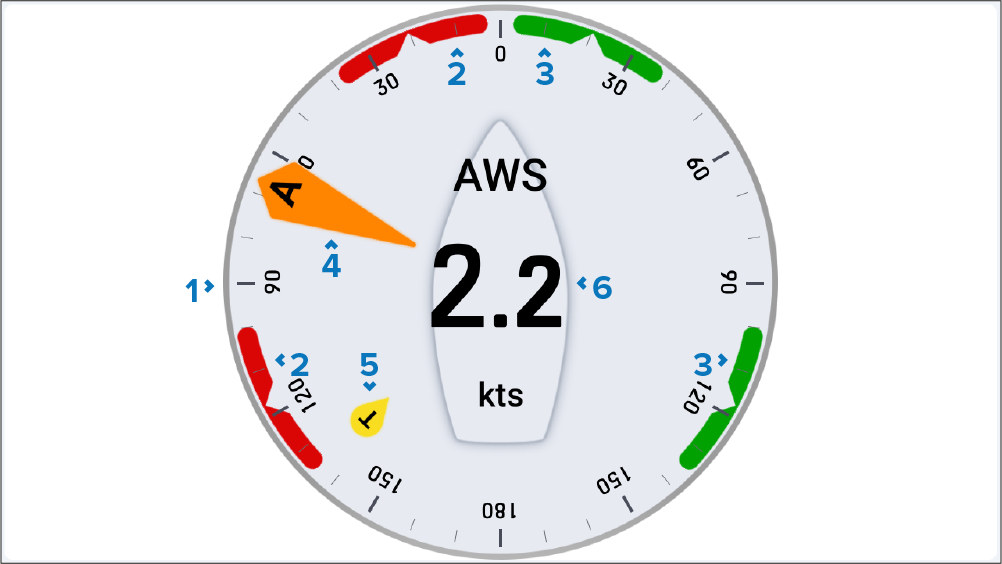
Angle gauge — The rotation of the angle gauge remains fixed and the indicators move around the gauge to indicate changes to direction / angle.
Port wind angle target — Align the larger wind indicator (AWA or TWA) with the notch to optimize Velocity Made Good (VMG) when sailing upwind or downwind.
Starboard wind angle target — Align the larger wind indicator (AWA or TWA) with the notch to optimize Velocity Made Good (VMG) when sailing upwind or downwind.
AWA indicator — Apparent Wind Angle.
TWA indicator — True Wind Angle.
Apparent wind speed / True wind speed — this changes based on the selected widget function.