Wi-Fi and Wireless Connection Settings
Wi-Fi and wireless connection settings are provided in the This display settings menu.
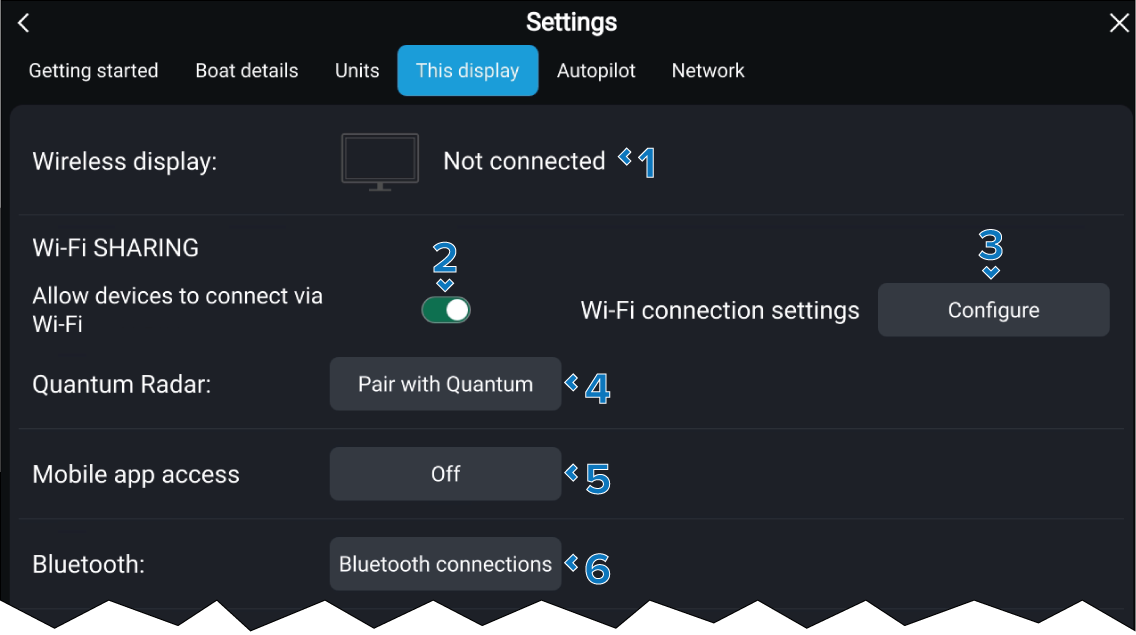
The following Wi-Fi and wireless connection settings are available:
Setting |
|
|---|---|
1 |
Wireless displayWireless display icon Select to search for a wireless display to use for display mirroring. For more information refer to: Connecting to a wireless display (Miracast®) |
2 |
Allow devices to connect via Wi-Fi Enable and disable mobile apps connecting to the display. |
3 |
Wi-Fi connection settings Configure Select to configure the display’s Wi-Fi access point. |
4 |
Pair with QuantumPair with Quantum Select to pair with a Quantum-Series Radar scanner using a Wi-Fi connection. For more information refer to: Pairing with a Quantum Radar scanner |
5 |
Mobile app accessMobile app access Select the type of access mobile apps can have to the display. The options are: Remote control (default), Viewing only or Off. |
6 |
Bluetooth settingsBluetooth settings Select to search and connect a Bluetooth device such as a Bluetooth speaker. For more information refer to: Pairing a Bluetooth speaker |