Waypoint at Range and Bearing from location
If an intelligence report is received that provides a target’s range and bearing from the reporter’s location a waypoint can be created using the reported details.
Waypoint at Range and BearingThe waypoint can be placed in the Chart app by opening the Chart context menu at the location given and selecting more options and then Place Wpt at Rng/Brg to open the Waypoint dialog.
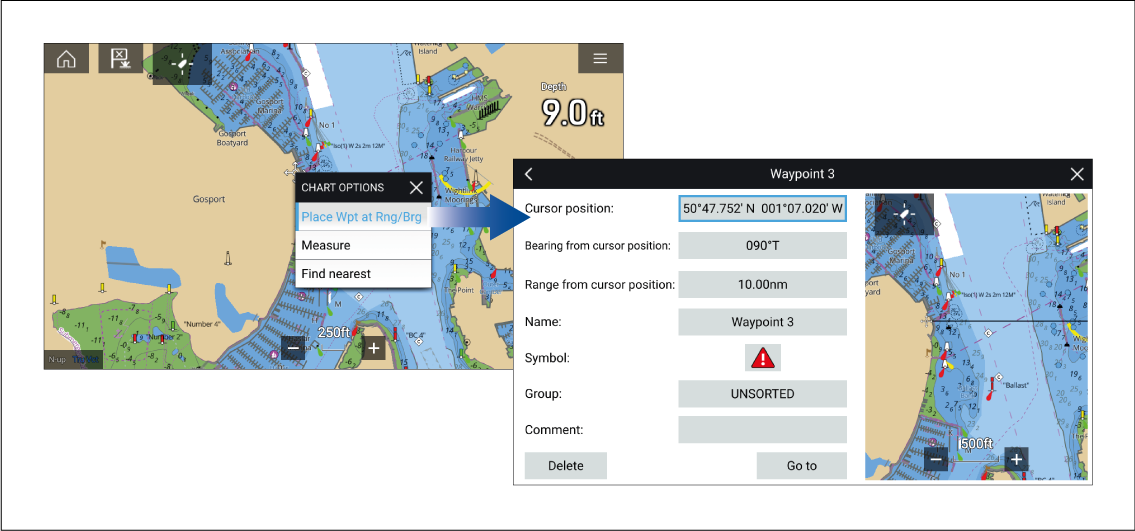
Figure 1. Screenshot of chart context menu and new waypoint dialog
As a minimum the following fields are required to create the waypoint:
Cursor position — Enter the reporter’s coordinates
Bearing from cursor position — Enter the reported target’s Bearing
Range from cursor position — Enter the reported target’s Range
The following additional fields can be completed, if required:
Name — Give the Waypoint a name
Symbol — Change the default Waypoint symbol.
Group
— Assign the Waypoint to a Waypoint group.Comments — Add any additional details.
To finalize the waypoint creation select Back or Close the dialogue.
From the Waypoint from range and bearing dialogue you can also Delete the Waypoint if you do not want to keep it, or initiate a Goto.