Target context menu

A target context menu is available that provides quick access to useful target settings.

Radar targetContext menu

To open the Radar target context menu, select a target onscreen.
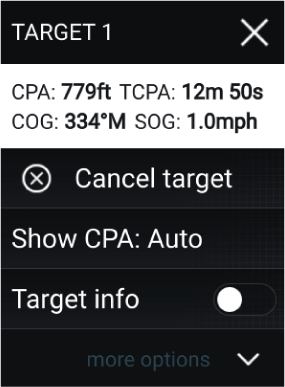
The Radar context menu provides CPA, TCPA, COG and SOG data for the selected target.

The context menu also provides the following target menu options:

  • Radar targetCancel targetCancel target — The Radar target will no longer be tracked.

  • Radar targetShown CPACPAShow CPA — Determines whether CPA graphics are shown.

    The default option is Auto which displays CPA graphics for the target if it becomes dangerous. You can also set CPA graphics to On, which displays CPA graphics, if there is an intersect point between your vessel’s current course and the target’s. When set to Off no CPA graphics will be displayed for the target.

  • Radar targetInformationTarget info — Determines whether the target’s SOG and COG information is displayed under the target onscreen.