Sonar scroll back (history)
You can “scroll back” in the Fishfinder app to view sonar history.
Fishfinder appScroll backFishfinder appHistorySonarHistory
To activate sonar “scroll back”, perform the following:
Sonar and DownVision — Swipe your finger left to right across the sonar screen.
SideVision — Swipe your finger from the bottom to the top of the sonar screen.
3D Vision — Select the onscreen Pause icon.
When sonar scroll back is active, the sonar Scroll back bar and Unpause icons are displayed.
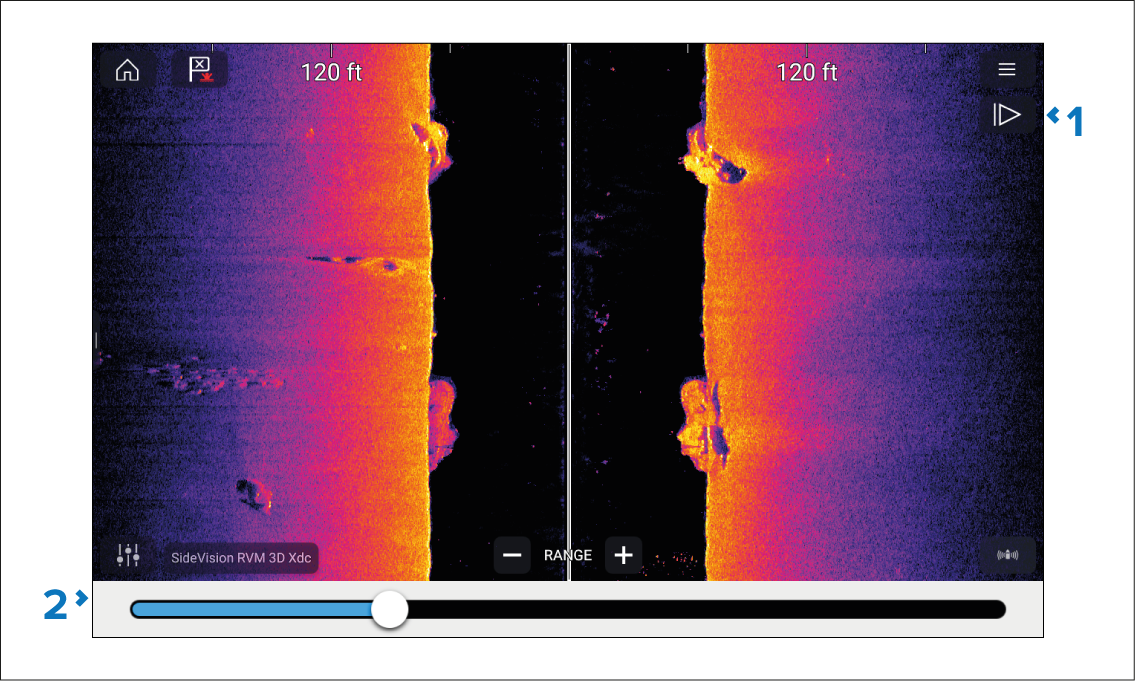
Unpause — Selecting this option resumes live sonar scrolling.
Scroll back bar — Use this to move back and forward through the available sonar history. You can either drag the position indicator right or left or select a specific location on the bar to jump to that position.
In Sonar, DownVision and SideVision channels, subsequent swipes of the screen will also “rewind” the sonar history, and swiping in the opposite direction will “fast forward” the sonar history.