Simulated autopilot control
When a Demo profile is enabled, simulated autopilot control is available using the Pilot sidebar in the Chart app.
When using the simulated pilot controls no live commands are sent to a connected autopilot.
When the simulated autopilot is engaged the turn controls located on the right side of the screen will be disabled.
SimulatorPilot controls
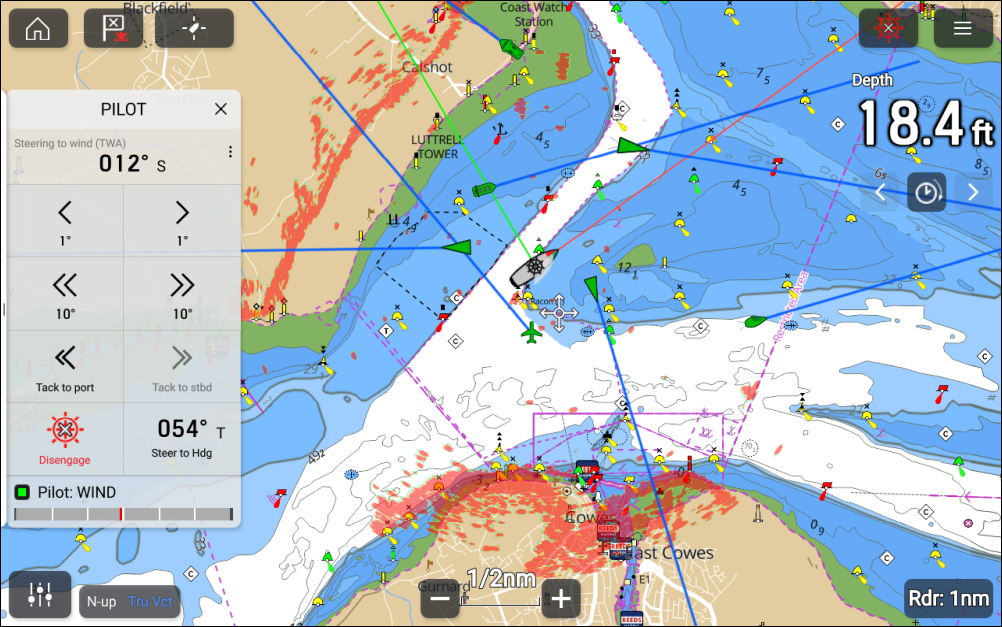
The simulated autopilot controls will allow you to:
Engage and disengage the simulated autopilot.
Switch between autopilot modes i.e.:
Steer to Heading
Steer to Nav
Steer to Wind — only available in the Sailing demo profile.
NoteThe Steer to Wind mode cannot be changed in the demo simulator.
Use the 1° and 10° turning controls to turn the boat.
Use the Tack to port and Tack to Stbd controls to tack the boat — only available in the Sailing demo profile.
See the simulated rudder bar position.