Setting controls
Various controls are available to aid settings adjustments.
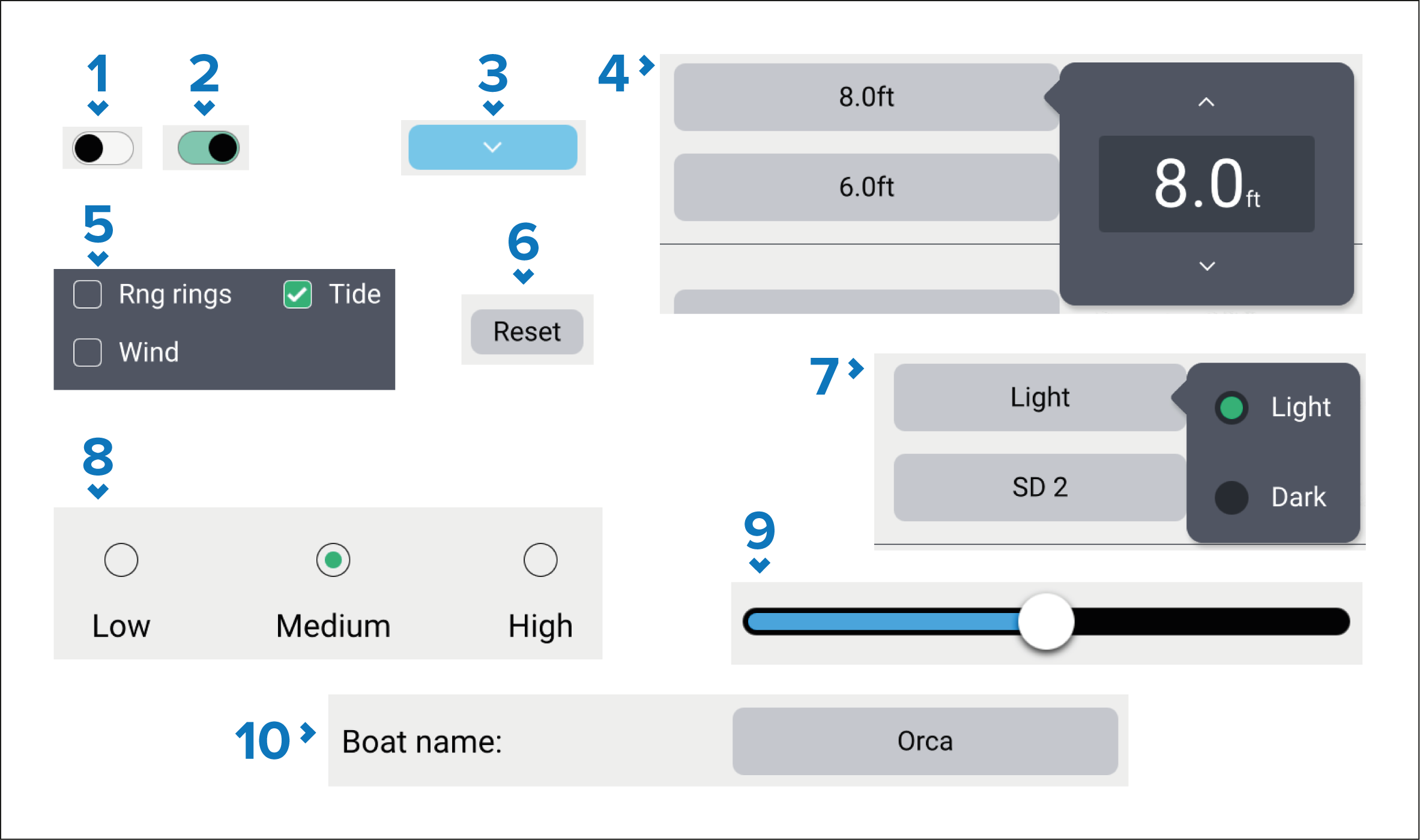
Toggle switch in off state (i.e.: disabled). Select to enable option.
Toggle switch in on state (i.e.: enabled). Select to disable option.
Page down button — selecting the page down button will scroll the current menu or settings page (when the page down button is visible you can also swipe to scroll up/down).
Setting field numeric value — selecting will display the numeric adjustment control you can then use the up and down arrows to adjust the value.
Tick boxes — when a tick is displayed in the box the option is enabled. Select the box to enabled and disable the option.
Setting button — selecting the button will perform the related procedure or acknowledge a notification.
Setting field options — selecting will display a pop-over menu with the available options, selecting an option will change selection to that option.
Radio buttons — selecting an option will change selection to that option.
Slider control — usually used for setting percentages, select and slide circle to adjust value.
Setting field text value — selecting will display the onscreen keyboard you can then enter the desired text.