Sail plan csv file layout
Sail plan csv files must be formatted as follows:
Sail plan Template fileLayout
A Sail plan csv template is available to download from the following web page: https://www.raymarine.com/en-gb/learning/online-guides/automatic-sail-plan-recommendations
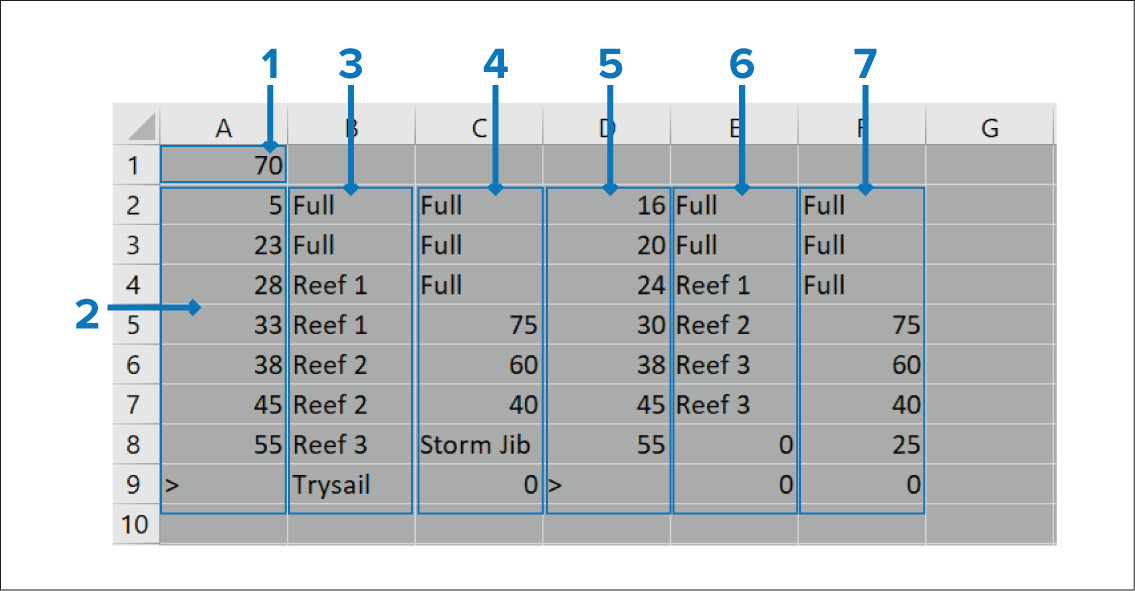
Upwind / Downwind crossover AWA — Defines the crossover point for the sail plan’s Apparent Wind Angle (AWA) performance; when this threshold is exceeded, the sail plan enters downwind mode.
Upwind AWS kts — Enter the upwind AWS band thresholds. For the maximum AWS value, use ‘>’
Upwind Mainsail — Enter each upwind band for the mainsail.
Upwind Headsail — Enter an upwind value for each band of the headsail.
Downwind AWS kts — Enter the downwind AWS band thresholds. For the maximum AWS value, use ‘>’
Downwind Mainsail — Enter each downwind band for the mainsail.
Downwind Headsail — Enter a downwind value for each band of the headsail.
Mainsail and Headsail parameters
The following parameters can be entered for the Mainsail and Headsail.
| Mainsail | Headsail |
|---|---|
Full |
No 1 |
Reef 1 |
No 2 |
Reef 2 |
No 3 |
Reef 3 |
No 4 |
Reef 4 |
Heavy Weather Jib |
Trysail |
Storm Jib |
None |
Full |
100 |
100 |
80 |
80 |
75 |
75 |
60 |
60 |
50 |
50 |
40 |
40 |
25 |
25 |
20 |
20 |
0 |
0 |