Run wizard calibration
You can calibrate your tank by setting a series of calibration points and filling your tank in intervals.
The shape of your tank determines how many calibration points you should enter for calibration. 2 calibration points are required as a minimum, but up to 101 points can be entered. Generally, the more calibration points entered the more precise tank readings will be.
Additional calibration points are used to account for changes in tank volume at different parts of an irregularly shaped tank. Depending on the size and shape of your tank it is recommended that you enter calibration points to mark each change in the shape of the fuel tank; for example, straight corners require an additional point, and slopes require 2 points.
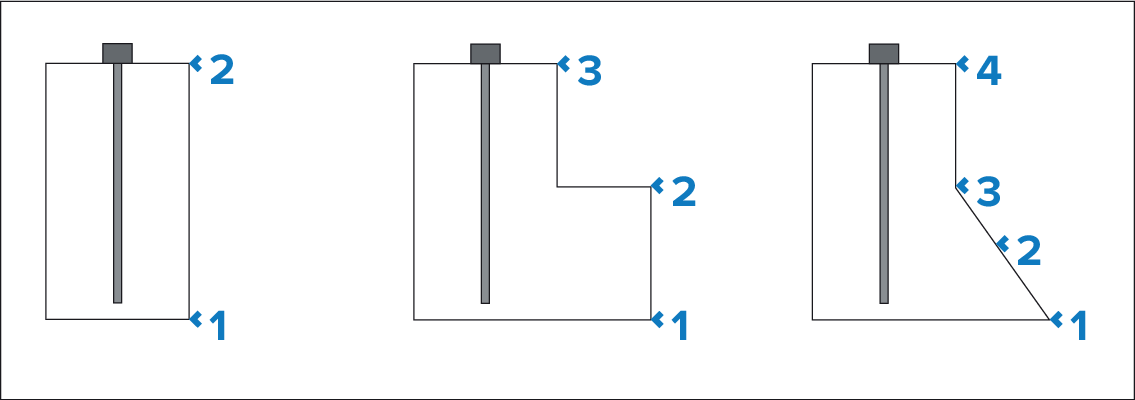
The illustration above shows the minimum number of calibration points recommended for some typical tank shapes:
The tank shown on the left is rectangular and symmetrical; it only requires 2 calibration points to define the bottom and top of the tank.
The tank shown in the center has a greater volume at the bottom; 3 points are required to define the bottom, top and corner of the fuel tank.
The tank shown on the right has a greater volume at the bottom and is sloped. 4 points are required to define the bottom of the tank, the top, and a further 2 points to define the slope.
Wizard calibration
- Select the number of calibration points (minimum of 2) and press next.
- Fill the tank to the units displayed on screen and press Ok.
- To complete the calibration process, repeat step 2 until the tank has been filled.