Route list
Routes are managed using the Route list.
RouteListThe Route list can be accessed from the Homescreen and from the Chart app:
If the Route list is accessed from the Chart app menu, then the selected route is displayed in the LiveView pane on the right of the screen. The Route list identifies the The following options are available from the Route list:
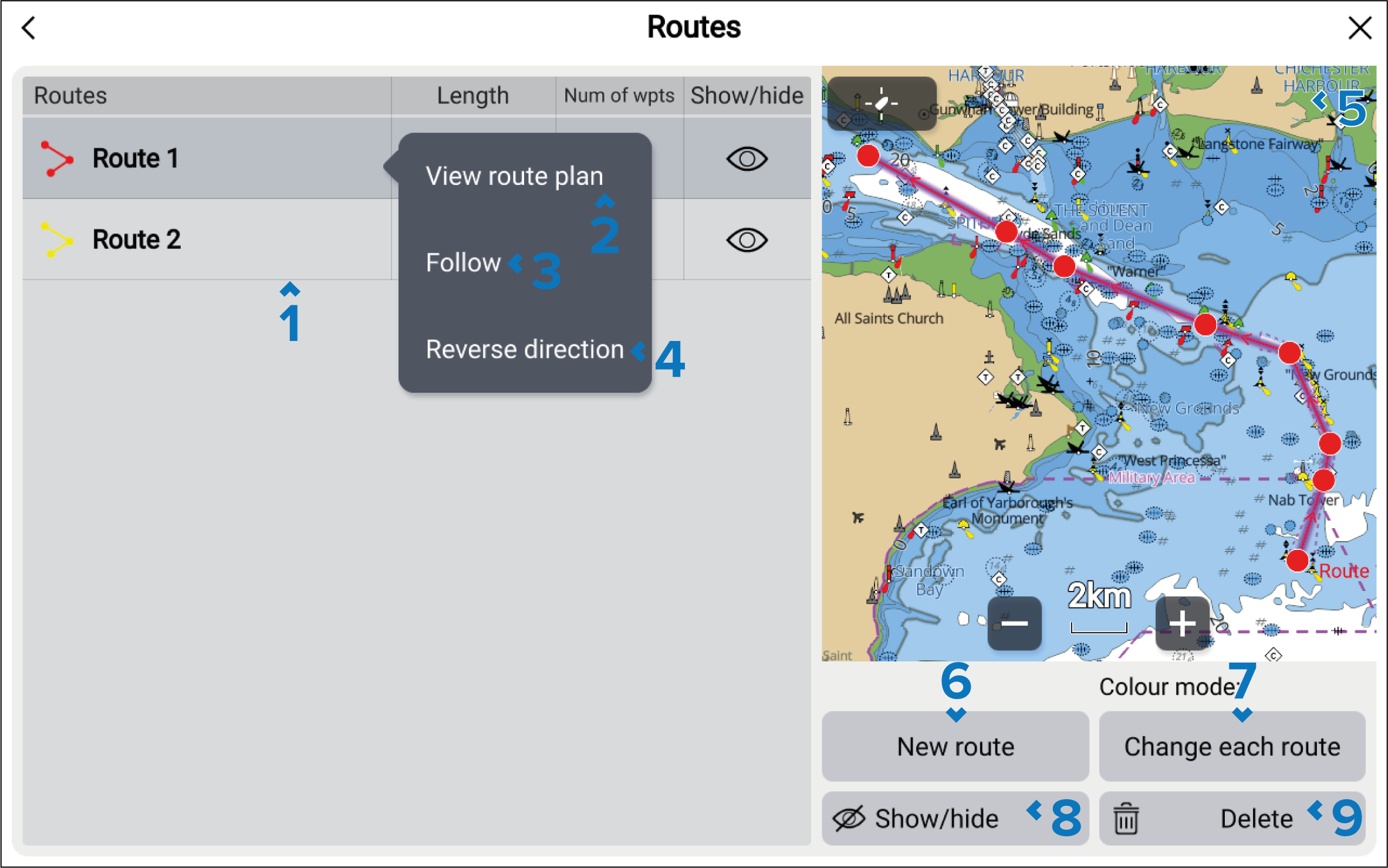
Routes — a list of routes. Selecting a route will open the pop-over menu.
View route plan — view the route plan.
Follow — close the menu and begin active navigation of the route.
Reverse direction — reverse the route’s direction. Selecting Reverse direction will overwrite the original route, swapping the start and end waypoints so that the route can be followed in the opposite direction. You can revert the route to its previous direction by selection Reverse direction again.
LiveViewLiveViewRoutes LiveView — when accessed via the Chart app, the LiveView pane is displayed. When a route is selected the LiveView will center the route in the LiveView pane.
New route — close the menu and open the route builder.
Color mode — change how colors are assigned to routes
Show/hide — show or hide the routes.
Waypoints DeleteDelete — select routes to be deleted from the system.