Recording sonar for troubleshooting
The fishfinder app scrolling image can be recorded and transferred to a memory card so that it can be sent to Raymarine technical support for analysis. This feature is intended to be used for diagnostic purposes only.
Note
The recording options shown in the screenshot below are only available in the fishfinder app when the Enable sonar recording option is enabled in the Diagnostics menu. For more information, refer to: Diagnostics sonar recording
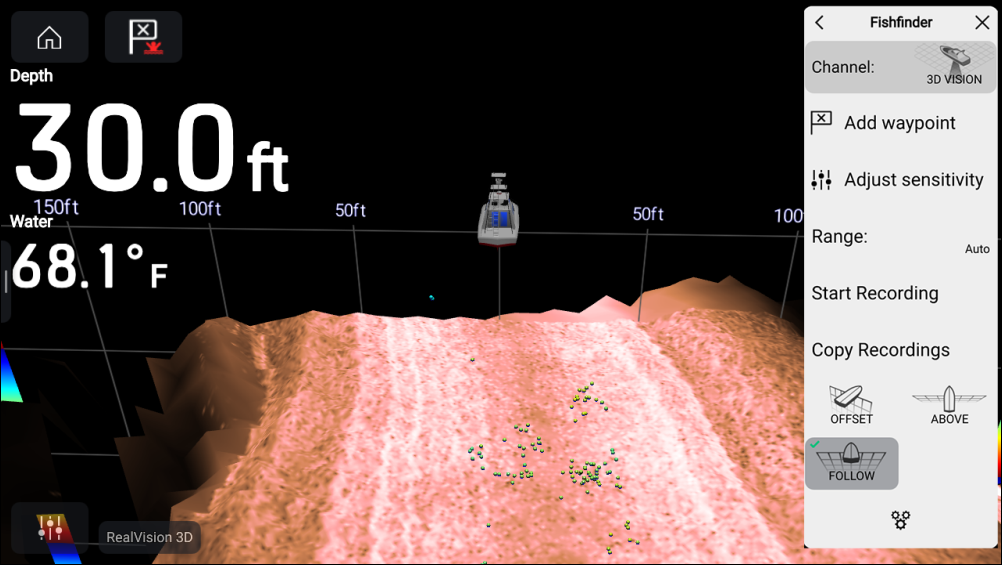
- Select Enable sonar recording from the Diagnostics menu: .
- Insert a memory card into a card reader slot.
- Open the fishfinder app.
- Select Start recording from the main menu.
- Select Stop recording from the main menu.
- Select Copy recording from the main menu.
- Select the relevant card reader slot.
- Select Copy recording.
A .rec video file will now be saved to the selected memory card.