Radar app overview
The Radar app displays a visualization of the echoes received from a connected radar scanner. The Radar app is a navigation aid used to help enhance collision and situational awareness by enabling target’s distance and speed to be tracked in relation to your vessel.
Up to 2 radar scanners can be connected at the same time. However, only 1 radar in a system can be a Quantum-Series radar.
For each instance of the Radar app you can select which radar scanner you want to use, the radar scanner selection will persist over a power cycle.
For details on how to interpret the Radar display refer to: Interpreting the Radar display
Radar appThe Radar app can be displayed in both fullscreen and splitscreen app pages. App pages may consist of up to 2 instances of the Radar app.
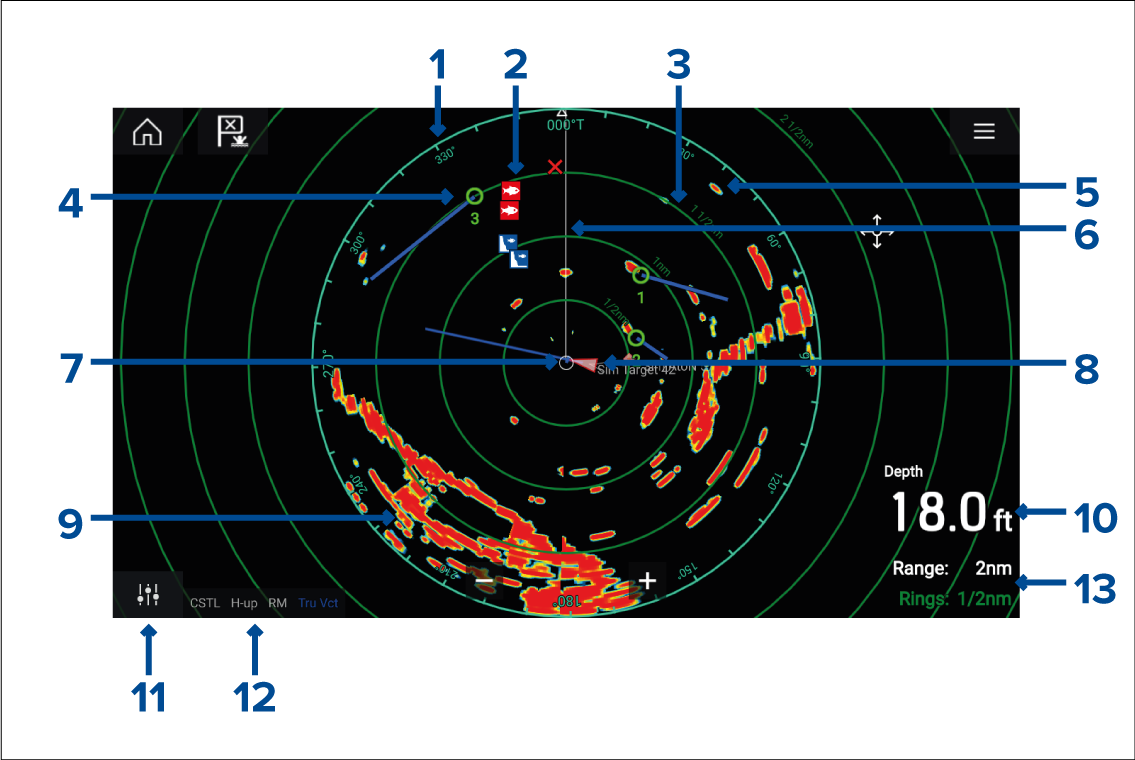
Azimuth ring — used to provide indication of bearing.
Waypoint symbols — waypoint symbols can be displayed in the Radar app.
Range rings — evenly spaced concentric circles help determine distances in the Radar app.
Tracked radar target — symbols with vector lines are used to represent tracked radar targets.
Radar return — possible target e.g.: vessel.
SHM (Ship heading marker) — points in the direction of travel on the azimuth ring.
Own vessel position — indicates own vessel position in relation to the radar returns.
AIS target — symbols with vector lines are used to represent AIS targets.
Radar return — land mass.
Data overlay — by default depth is displayed.
Sensitivity controls — access the Radar app’s sensitivity controls.
Radar mode and status — identifies the radar mode, orientation and motion mode.
Range and rings — shows the current Radar app range and spacing between range rings.
The Radar app allows you to configure alarms which are triggered when a target or object conflicts with the Dangerous targets or Guard Zone alarm settings.
The range rings, azimuth ring and VRM/EBLs can be used to identify a target’s distance and heading in relation to your vessel.