Predicted areas of danger settings
The Predicted areas of danger feature can be enabled for AIS targets and Radar targets in the Chart app.
Collision avoidancePredicted areas of danger
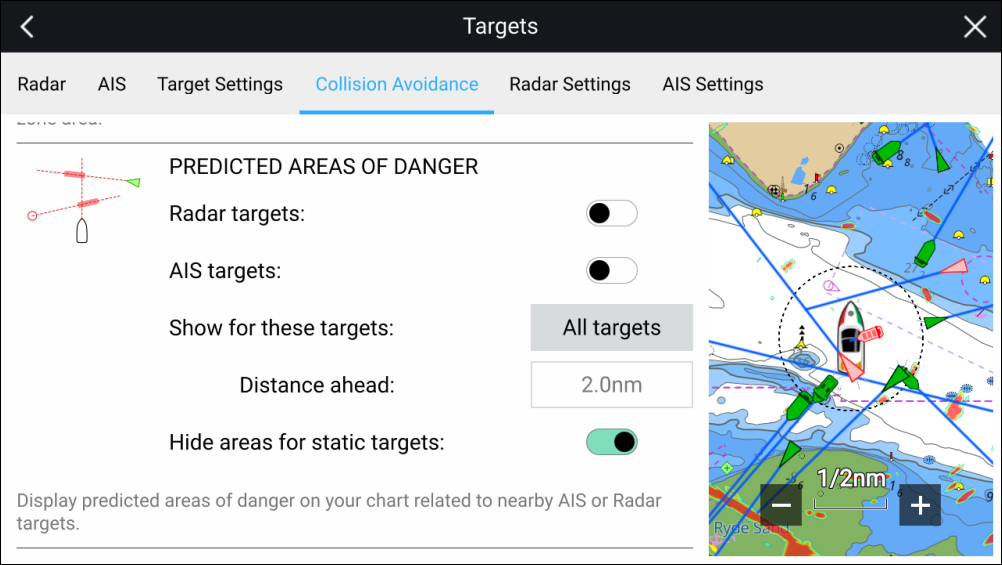
In the Collision Avoidance menu you can change the settings to determine which types of target (i.e. AIS and Radar) will have an Interception zone:
Radar targets — Enables and disables Predicted area of danger graphics for detected Radar targets.
AIS targets — Enables and disables Predicted area of danger graphics for AIS targets.
Show for these targets — Determines when Predicted area of danger graphics are displayed. Graphics can be displayed for:
All targets — all targets onscreen.
Targets crossing my course — only targets which are predicted to cross your vessel’s path
Distance ahead — Changes the distance ahead of your vessel that the Interception line is drawn (only available with Targets crossing my course selected). The distance can be set to a value between 0.5 nm to 5.0 nm.
Hide areas for static targets — Enables and disables graphics for Static targets, targets travelling less than 2.0 kts will NOT have Predicted area of danger zones.