NMEA 2000 diagnostics
You can view and record data transmitted to, and received from, connected NMEA 2000 / SeaTalk NG devices.
The resulting log can assist in troubleshooting device / data issues, and can also be saved to an encrypted file in the root directory of a memory card. This log file may be requested by Technical Support when discussing technical issues. You will not be able to view the encrypted file yourself.
NMEA 2000 diagnosticsDiagnostics NMEA 2000The diagnostics menu is displayed by selecting the NMEA devices & messages option from the Diagnostics button: .
The menu displays a list of connected devices:
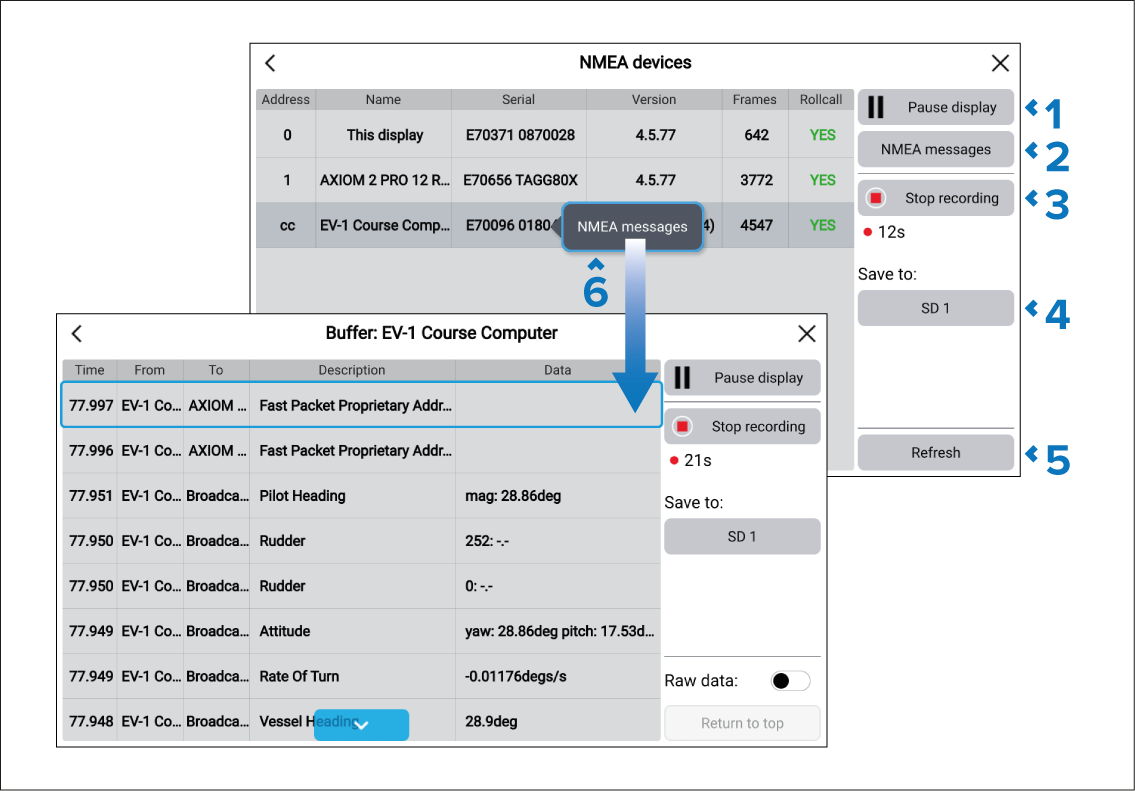
From the diagnostics menu you can:
Resume display / Pause display — Select button to start or stop the display of data.
NMEA messages — Select to display a list of all transmitted and received data from all devices.
Start recording / Stop recording — Select to start or stop recording data to a memory card. The data will be saved to an encrypted file in the root directory of a memory card. You will not be able to view the encrypted file yourself, but it may be requested by Product Support when assisting you in troubleshooting technical issues.
Save to: — Select to choose a card reader slot to save the data to.
Refresh — Select to refresh the list of devices.
NMEA messages — Select a device from the list and select NMEA messages to view a list of messages for that device.