Hold heading
Hold heading mode aligns the motor initially with the boat’s current heading and then maintains that thrust heading regardless of the boat’s position. Actual boat heading and COG may differ to the motor’s fixed direction due to tide and wind conditions.
Sidebar TrollingTrolling motor Hold heading mode
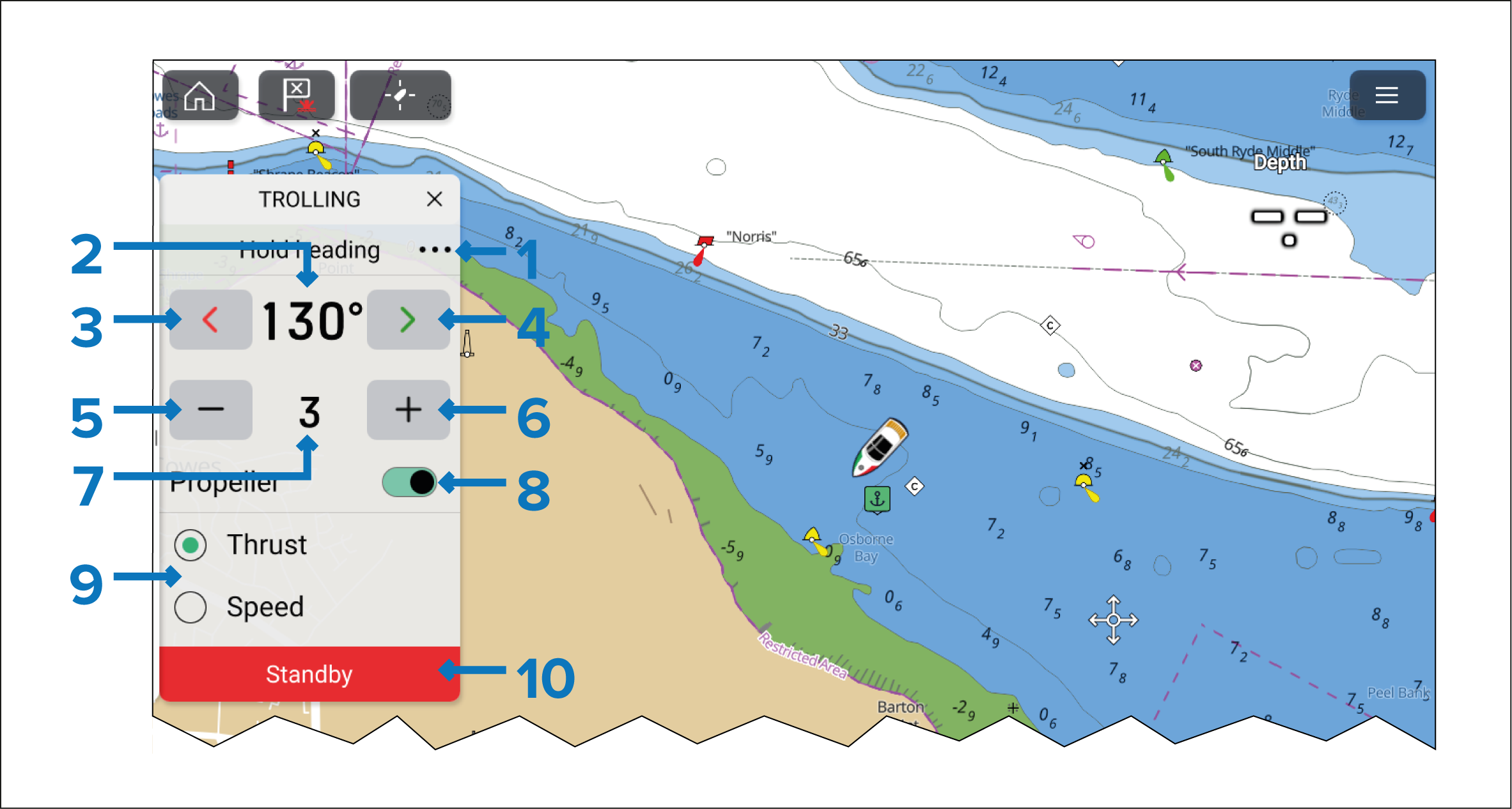
The Hold heading sidebar includes the following controls:
Menu — Select the three dots to access the available Trolling motor modes.
Heading (of the trolling motor).
Steer port.
Steer starboard.
Decrease thrust/speed.
Increase thrust/speed.
Current thrust percentage/speed.
Propeller — Engages and disengages the trolling motor’s propeller. (Only available on Power-Pole® trolling motors).
Thrust/Speed selection — If required, Thrust and Speed can be switched by selecting the relevant option.
Standby — You can select Standby at any time to place the Trolling motor into standby mode.
In Hold heading mode the thrust level is user selected. In extreme wind or current it is necessary for the user to select a speed setting with adequate thrust to remain on course.
Speed/thrust and steering range and increments are determined by the Trolling motor and as such could be different or change.