GNSS (GPS) Status
Your vessel’s GNSS (GPS) position is displayed in the top left corner of the Homescreen. The status of the position fix and the satellites in use is displayed in the Fix menu.
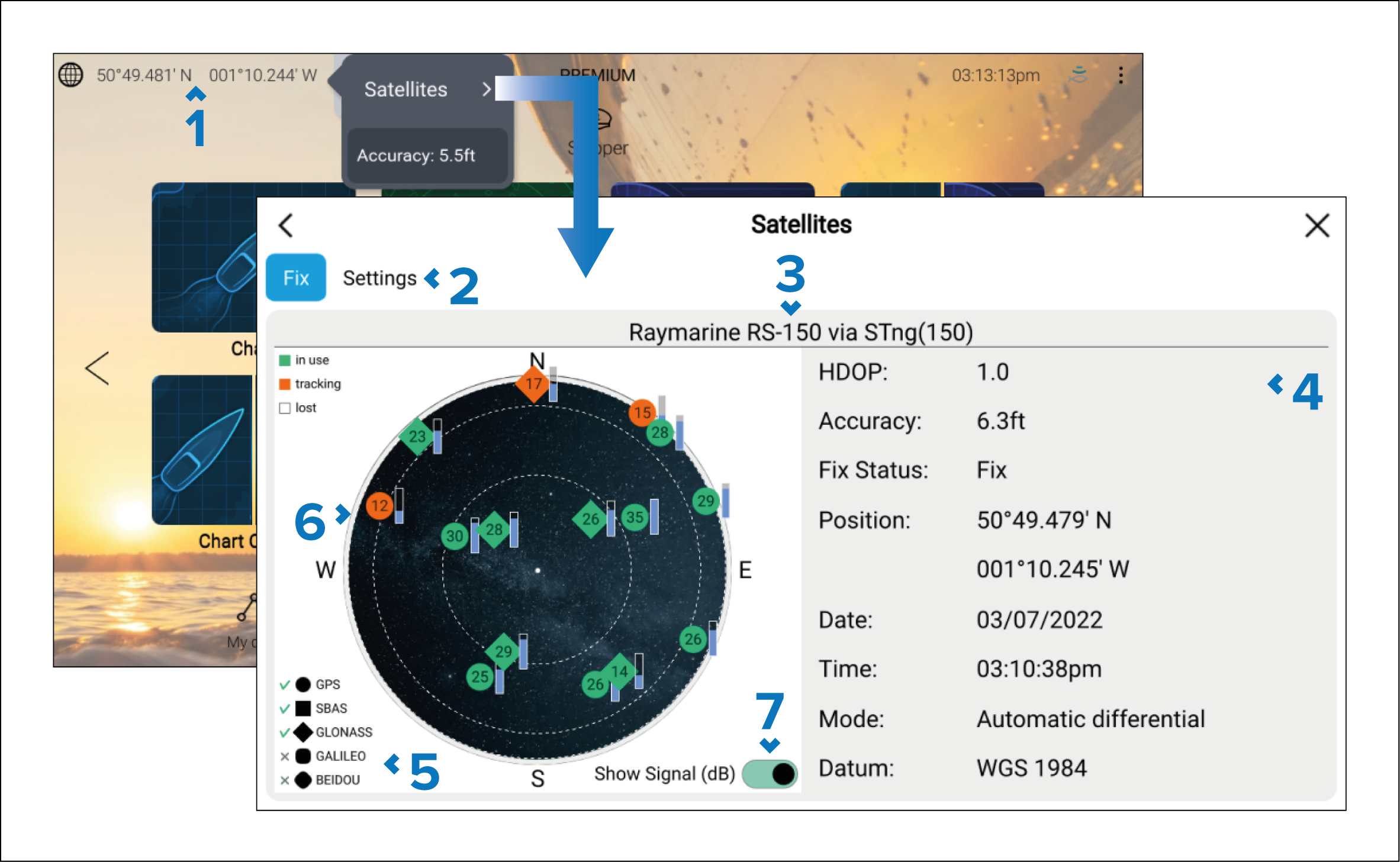
If latitude and longitude is displayed on the Homescreen, you have a valid position fix. If the text turns red, your fix accuracy is low.
To access the Fix menu, select the Position details area on the Homescreen and then select Satellites from the Pop-over menu.
Select to access settings related to the GNSS (GPS) receiver.
The name of the GNSS (GPS) receiver currently being used to provide position data to the system is displayed centered at the top of the screen.
Position fix and fix accuracy data is displayed.
NoteNot all chartplotter internal GNSS (GPS) receivers display Accuracy data.
The shape of the satellite symbols identify which GNSS constellation they belong to.
NoteTicks are shown next to the symbols to indicate which constellations are currently selected for positioning.
The sky view on the left side of the page shows the position of navigation satellites. The color of the satellite identifies its status:
Green = satellite in use
Orange = tracking satellite (not currently used for position fix)
Gray = searching for satellites
The signal strength indicator for the satellites can be enabled and disabled using the Show Signal (dB) toggle switch.