GNSS settings
The settings for your GNSS (GPS) receiver (internal or external) can be accessed from the Satellites menu: .
GNSS (GPS) SettingsSettings displayed are for the GNSS (GPS) receiver currently in use. The name of the GNSS (GPS) receiver currently being used by the system is displayed in the Fix menu.
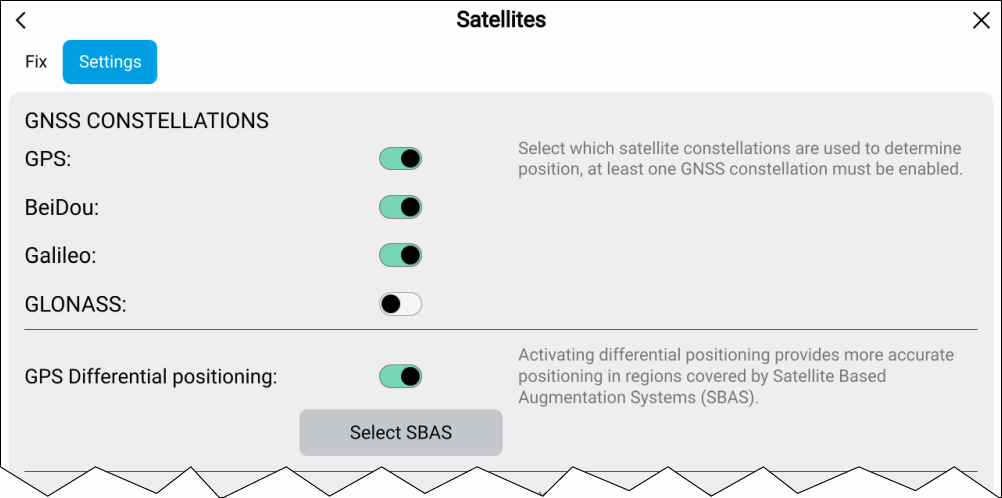
GNSS (GPS)ConstellationsGNSS Constellations:
The GNSSs available are:
GPS (USA)
BeiDou (China)
Galileo (EU)
GLONASS (Russia)
BeiDou and GLONASS cannot be enabled at the same time.
GNSS constellation selection options will be disabled ‘grayed out’ when using an incompatible GNSS (GPS) receiver.
GNSS constellation compatibility is dependent on GNSS receiver and software version for a compatibility list refer to: Raymarine GNSS receiver compatibility
SBASGNSS (GPS)Differential positioningSBASDifferential positioning:
Enable and disable the use of Differential positioning (SBAS) using the toggle switch. Enabling differential positioning provides more accurate positioning in regions covered by Satellite Based Augmentations Systems (SBAS).
Select the Select SBAS button to view a list of supported SBASs used for differential positioning. The SBASs being used can be enabled and disabled using the relevant check boxes
SBAS requires the GPS constellation to be enabled.
SBAS selection options will be disabled ‘grayed out’ when using an incompatible GNSS receiver.
SBAS compatibility is dependent on GNSS receiver and software version for a compatibility list refer to: Raymarine GNSS receiver compatibility
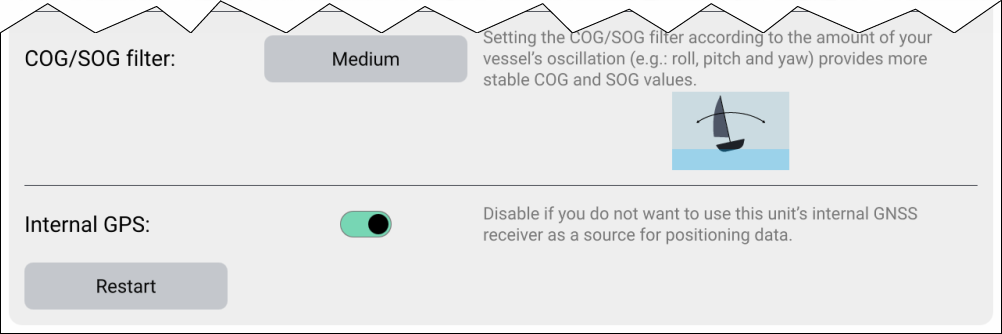
COG / SOG filterGNSS (GPS)COG / SOG filterCOG / SOG filter
Setting the COG / SOG filter according to the amount of your vessel’s oscillation (e.g.: roll, pitch and yaw) provides more stable COG and SOG values.
The data reported by your GNSS receiver provides an instantaneous measure of the receiver’s speed and direction. Under certain conditions the data can become erratic. (e.g.: a slow moving sailing vessel in rough seas will have a high oscillations and will benefit from a High setting, whereas a power boat that can quickly change speed and direction will have a low oscillation and will benefit from a low settings.)
The available options are:
High
Medium
Low
The filter does not affect your GNSS receiver’s reported position.
GNSS (GPS)Internal receiverInternal GPS
if you do not want to use the display’s internal GNSS receiver as a source for positioning data you can disable the internal receiver using the Internal GPS toggle switch. .
For troubleshooting purposes you can also Restart the active GNSS receiver.