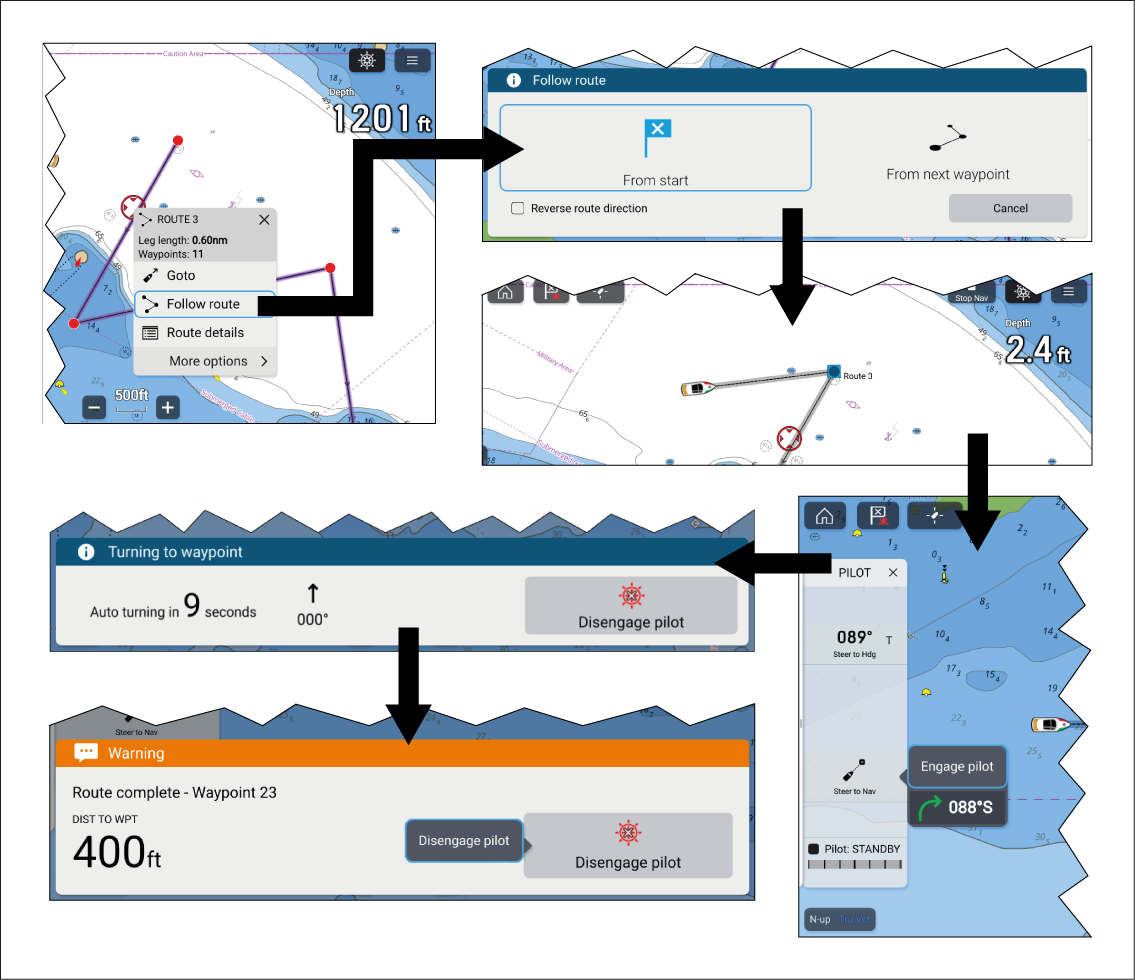
Once a route is created or imported it can be navigated
by performing a Follow route. When autopilot integration
and automatic turning are enabled, performing a follow route will
provide the option to engage the autopilot and commence active navigation
which will guide you through each route leg and turn the vessel automatically
when each waypoint is reached.
Important
It is the captain’s responsibility
to ensure a route is safe to navigate before commencing the follow.
Follow the steps below to perform a Follow route using automatic turning.
RouteFollowSelect and hold on any route leg (the line drawn between the each
of the route’s waypoints).
Select Follow Route from the context
menu.
You can also select one of the route’s waypoints and select more options and then Follow route.
Note
If you select the first waypoint in a route then
the next step is skipped and active navigation commences immediately.
Select the desired follow option from the Follow route
notification:
Select From Start to commence active
navigation from the first waypoint in the route.
Select From next waypoint to commence
active navigation from the next waypoint after the selected route
leg.
Select From this waypoint to commence
active navigation from the selected waypoint.
Note
The Reverse route direction option allows
you to permanently reverse the route (i.e.: switch the start and end
waypoint) so that the route can be followed in the opposite direction.
To reverse the route select the check box and then choose either the
desired options to commence active navigation.
If the selected waypoint is part of more than 1 route then
the Route list will be displayed so that you can choose which route
you want to follow.
If required, engage the mechanical drive by either engaging
the wheel drive’s clutch or attaching the pushrod onto the tiller
pin.
Select the Pilot icon located at the
top of the screen.
Select Steer to Nav from the Pilot sidebar.
Select Engage pilot.
Your vessel will turn and navigate to the indicated
waypoint.
The waypoint arrival alarm will trigger when your vessel
reaches the Waypoint arrival radius (pilot in track mode) and a countdown
will commence.
If the Waypoint arrival alarm is disabled
then the Auto turn toast notification is displayed instead of the
Auto turn waypoint arrival notification.
The waypoint Arrival radius (pilot in track mode) can be set from the
Alarms manager: Homescreen > Alarms > Settings > Arrival radius (pilot in track mode). The Arrival radius (pilot in track mode) overrides the standard Arrival radius notification.
Important
When the auto turn countdown
reaches zero your vessel will automatically turn towards the next
waypoint. NO user action or confirmation is required.
Repeat step 8 until the last waypoint in the route is reached.
Select Disengage pilot from the notification.
Select the Stop Nav onscreen icon located
at the top of the screen or select Stop from the
context menu or Navigation menu to end active navigation.
You can end active navigation at any time by selecting
the Stop Nav onscreen icon located at the top of
the screen or selecting Stop from the context menu
or Navigation menu.
For more information
on routes and route management refer to: Routes