Fish mapping layers
The fish mapping layers allow you to overlay fishing data in the chart app to help you identify the best locations for finding fish.
ChartFish mapping layersThe following fish mapping layers can be enabled and disabled from the Fish mapping layers menu:
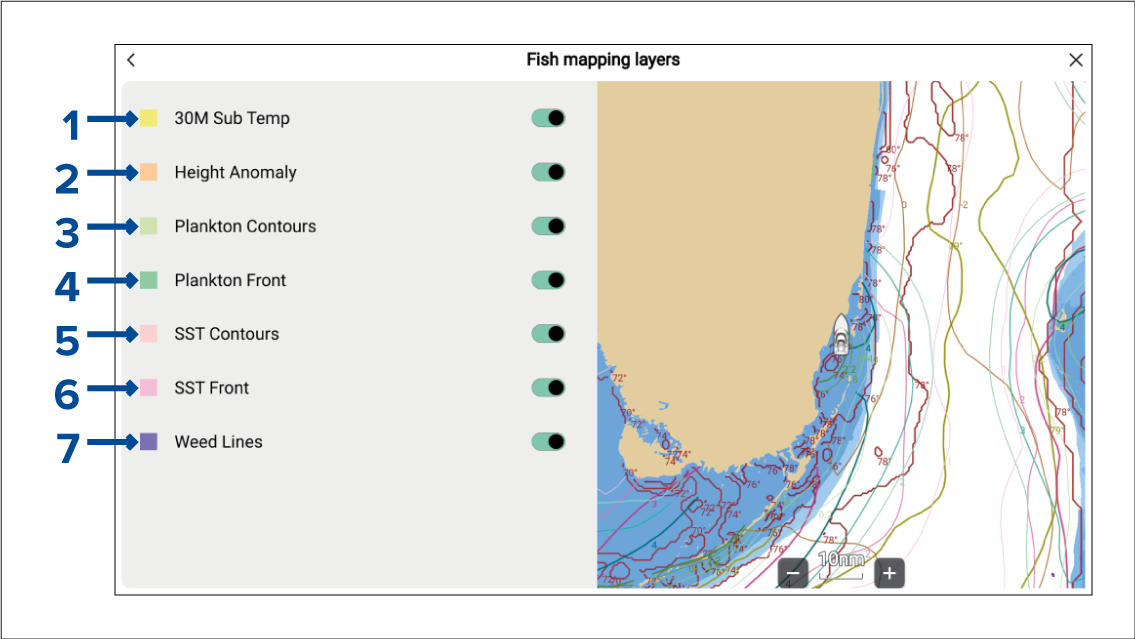
30M Sub Temp (30 metre sub-surface sea temperatures) — View contour lines for bodies of water below the surface temperature range.
Height Anomaly (Sea surface height anomaly) — View contour lines for locations where the sea surface height is different than the surrounding area. The anomalies show where fronts, eddies, upwellings and downwellings are located.
Plankton Contours (Plankton concentration contours) — View contour lines for areas of plankton concentration to help identify favorable conditions.
Plankton Front (Plankton front strength) — View contour lines for areas of strong plankton concentration bordering areas with relatively low or no plankton.
SST Contours (Sea Surface Temperature contours) — View contour lines for sea surface temperatures.
SST Front (Sea Surface Temperature front strength) — View contour lines for areas where there are significant temperature changes which create distinct temperature boundaries between bodies of water.
Weed Lines — View contour lines for locations where floating algae/plants have been sighted recently, or are most likely to be forming. The weed lines contour can be animated using the Animate weed lines option in the main menu. The weed line animation can cover a period of up to 3 days (i.e.: today and up to 2 previous days).
Color gradients are used to identify the concentration or strength of the relevant contour e.g.: a darker color for plankton contours indicates a higher concentration of plankton in that area. The legend shows the color gradients used and what they represent.
Fish mapping layers are also available in Fishing chart mode. Refer to: Fishing intel menu: Fishing intel menu