Enable sync
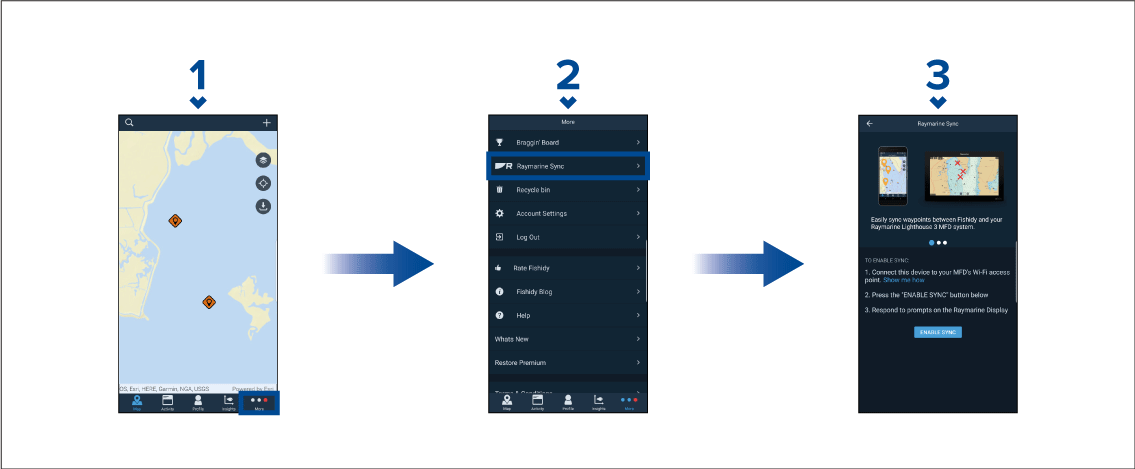
After connecting your mobile device to your MFD’s Wi-Fi, you can begin syncing waypoints and Fishidy spots with the Fishidy app.
- Select Enable Sync to begin synchronization
between your Fishidy app and MFD.
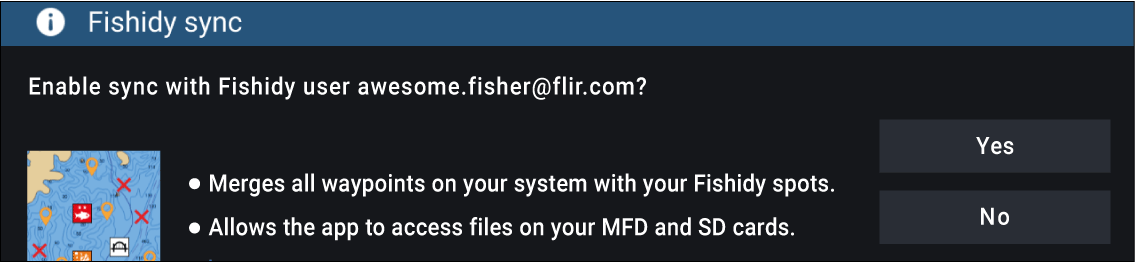
- When prompted by your MFD, select Yes to confirm sync.
If you select No, sync will be cancelled and will need to be restarted.
Once enabled, data will automatically sync in real-time across both devices via Wi-Fi.
Fishidy Spots and Waypoints will be shared and can be interacted with from both devices.
Your private waypoints remain private, whether viewing on Fishidy or your Raymarine MFD system.
If you edit a Fishidy Spot or Waypoint on either device when sync is disabled (e.g. editing the name), re-enabling sync might place the item in the Fishidy Recycle Bin. In this scenario, the data can be restored from the recycling bin in the Fishidy app.
Attempting to sync a new Fishidy account to your MFD while it is already synced with another account will prompt you to end sync with the first account. Ending sync with the first account and syncing the second account replaces any existing Fishidy Spots and Waypoints.