Dangerous targets alarm
Use the Dangerous targets alarm to notify you if a Radar target or AIS target will reach a specified distance from your vessel within a specified time.
Dangerous targets alarmThe Dangerous targets alarm settings can be accessed from the Collision Avoidance menu: .
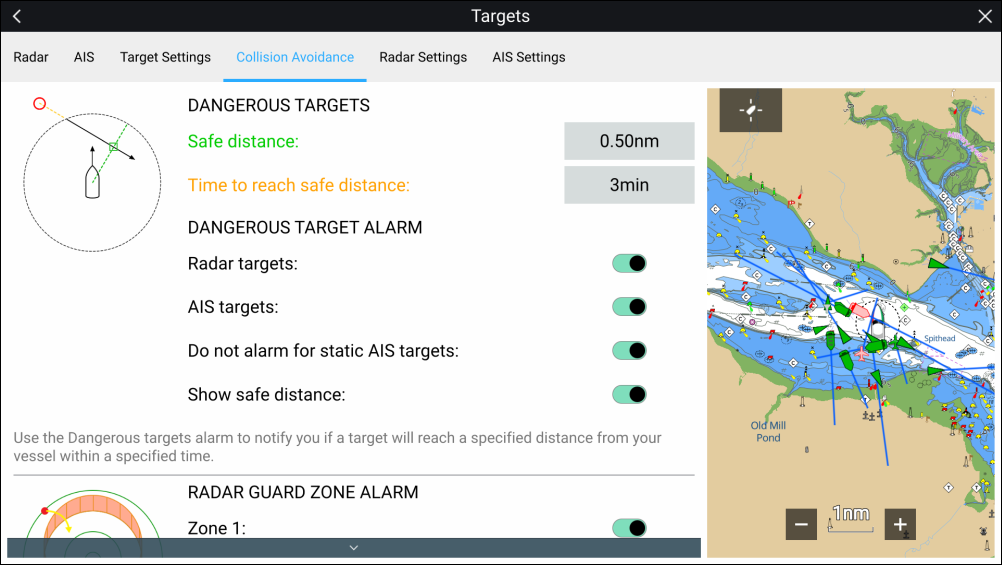
To set up the Dangerous targets alarm, adjust the Safe distanceSafe distance to the desired value and then select a Time to reach safe distance. The alarm will be triggered if a tracked target will reach the specified Safe distance from your vessel within the time period selected.
The following additional options are available for the dangerous targets alarm:
Dangerous targets alarmRadar targetsRadar targets — Enables Radar targets to be included in the dangerous targets alarm. If this setting is disabled Radar targets will not trigger the dangerous targets alarm.
Dangerous targets alarmAIS targetsAIS targets — Enables AIS targets to be included in the dangerous targets alarm. If this setting is disabled AIS targets will not trigger the dangerous targets alarm.
Dangerous targets alarmIgnore static targetsDo not alarm for static AIS targets — Enables ability to ignore AIS targets that are considered static (travelling under 2 Knots). Static targets that become dangerous will still be identified onscreen but will not trigger the dangerous targets alarm.
Dangerous targets alarmShow safe distanceShow safe distance — Enables display of a safe distance circle around your vessel.