Creating an app page

New app pages can be created in the empty slots available on the homescreen.

App pages can include MFD apps (e.g.: Chart app, Radar app etc.) and also shortcuts to the user interface of 3rd party integration partner’s hardware, if connected.
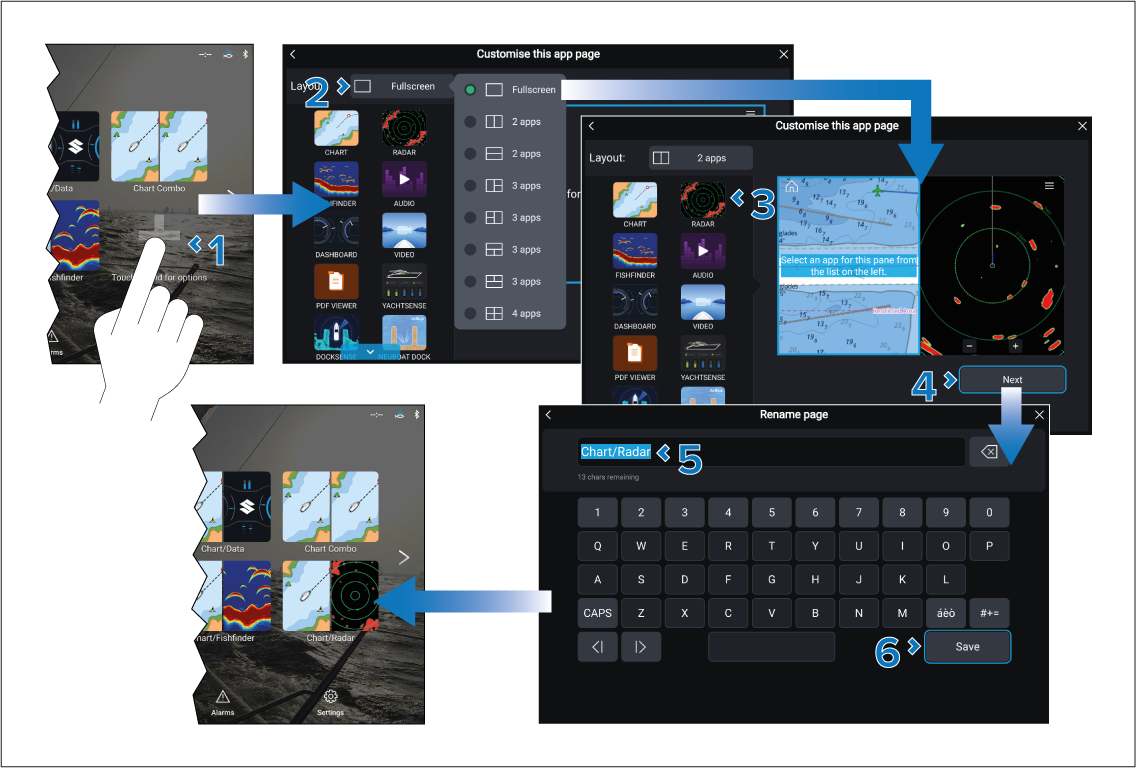
App pagesCreating
  1. Press and hold on the plus + icon, or on an empty slot on the Homescreen.
  2. Select the Layout: option and choose the desired page layout.

    Some apps are restricted to certain layouts.

  3. Select the icons for the Apps that you want to be displayed on the page.
  4. Select Next.
  5. Enter a name for your new app page.

    A default name will be suggested.

  6. Select Save.

The app page is saved and the new app page icon will be shown on the homescreen.