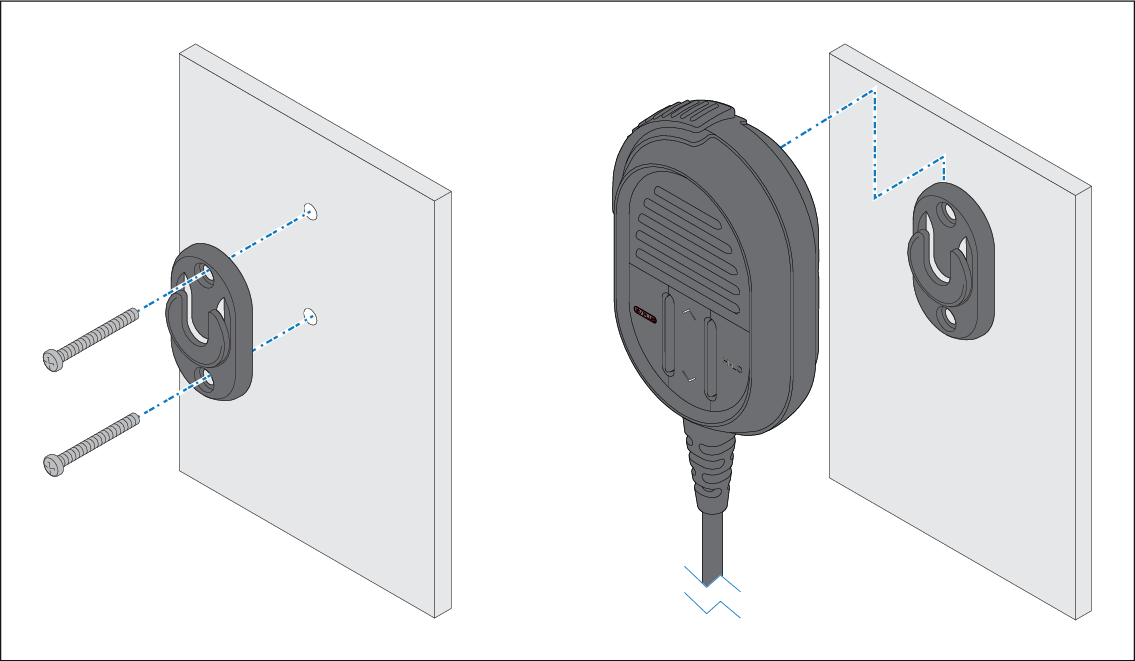
The Fistmic can be mounted by following the steps
below. Whilst only the Fistmic is pictured, you can also mount the
Handset using the same Hook plate (mounting clip).
Before mounting the unit, ensure that you have:
Selected a suitable location, ensuring there is nothing behind
the mounting surface that may be damaged when drilling.
Identified the cable connections and route that the cables
will take.
MountingHook plateFistmicRaymicHandset
Check the selected location for the Hook plate, a clear
flat area is required, with sufficient space around it to place and
remove the Fistmic / Handset and coiled cable.
Using a pencil, offer up the Hook plate to the desired
location and mark the location of the screw holes on the mounting
surface.
Drill the mounting holes using a suitable size drill bit.
Hold the Hook plate in place and secure using the screws
provided.
Hook the Fistmic / Handset over the Hook plate and gently
push down until it clicks into position.
Note
The Fistmic can only be hooked and unhooked from the Hook plate
when held vertically.
Drill bit, tap size and tightening torque is dependent on the
thickness and type of material the unit is to be mounted on.