Connecting the wireless speaker to the Wireless handset

You can connect a Wireless speaker to your Wireless handset.

ConnectionsWireless speakerWireless speakerPairing
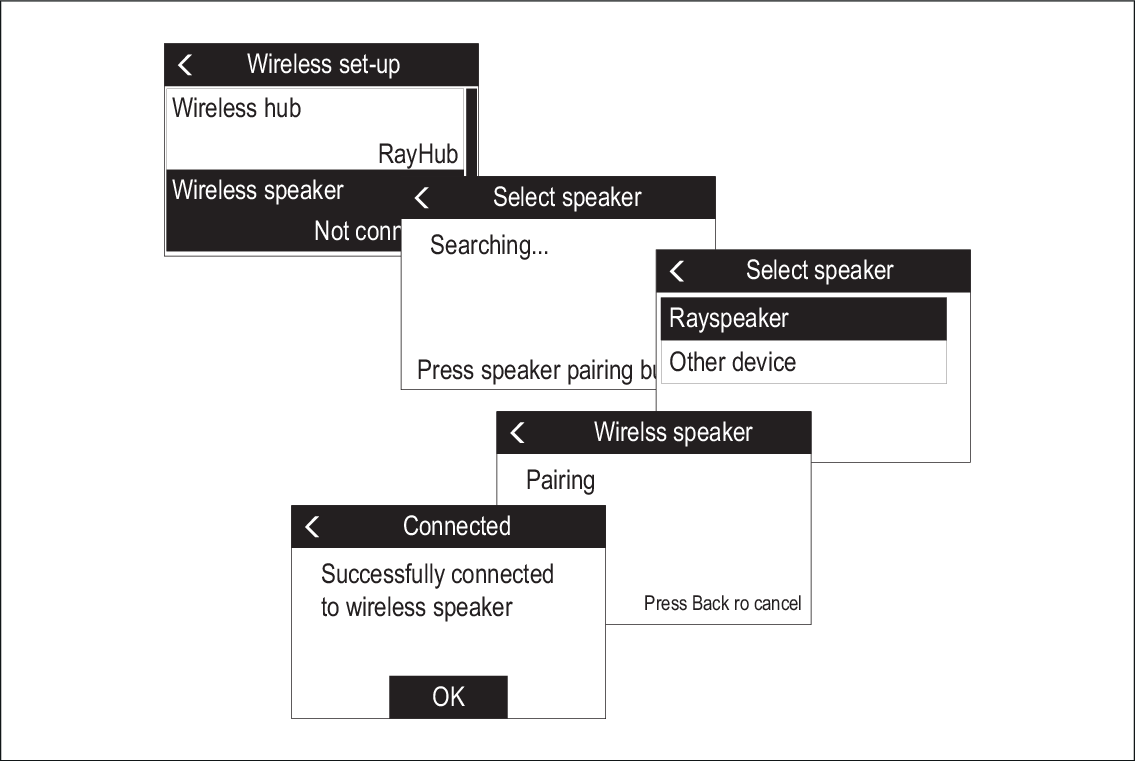
  1. Power on the Wireless speaker.
  2. Press the Pairing button on the front of your Wireless speaker to pair with a Wireless handset for the first time.
  3. Using the Wireless handset, select Wireless speaker from the Wireless set-up menu: Menu > Maintenance > Wireless set-up

    The handset will search for available devices.

  4. Select your Wireless speaker from the list.

    The Wireless handset will now pair with the Wireless speaker.

  5. Select OK.

The Wireless handset’s audio will now be heard through the Wireless speaker.

Note
  • You can only output audio to 1 speaker from the same handset.

  • If the pairing is unsuccessful, power the wireless speaker off and then back on again and repeat the process.