NMEA 2000 / SeaTalk NG connection
The display can be connected to a NMEA 2000 / SeaTalk NG network by connecting a spur cable to the DeviceNet connector located on the supplied power / NMEA 2000 cable.
ConnectionNMEA 2000SeaTalk NG
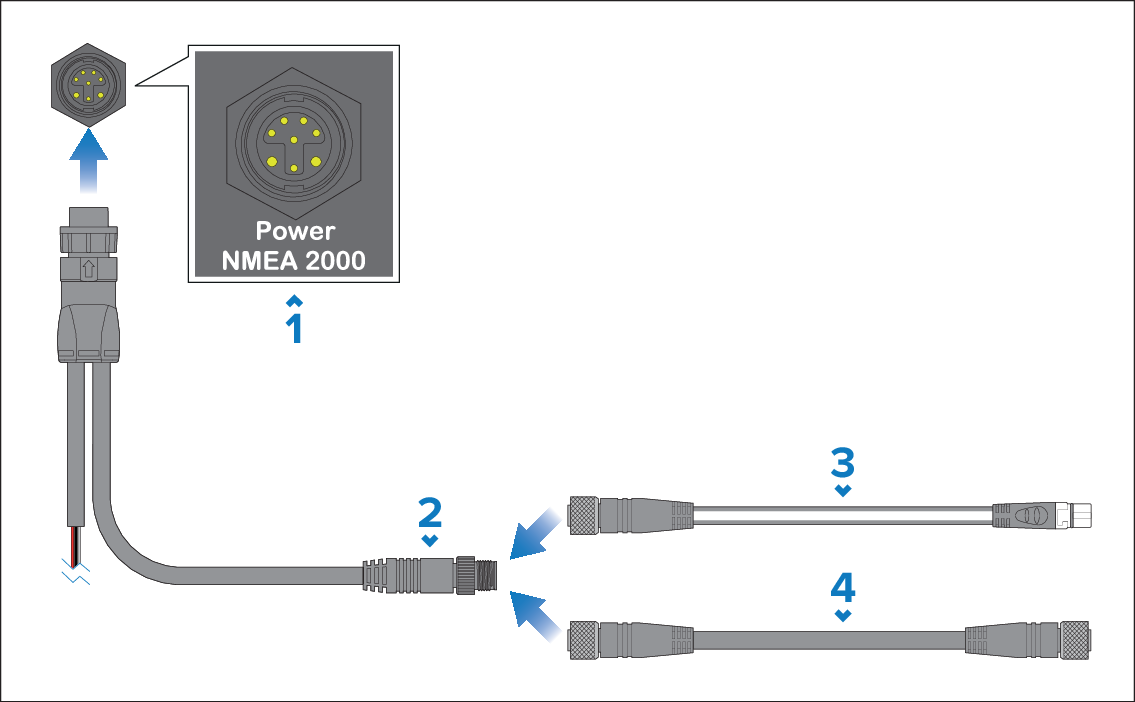
Display’s power / NMEA 2000 connector.
Power / NMEA 2000 cable’s DeviceNet (Micro-C 5 pin male) connector.
Use the supplied DeviceNet to SeaTalk NG adaptor cable to connect the display to a SeaTalk NG network backbone.
Alternatively, you can connect the display to a NMEA 2000 backbone using a standard DeviceNet cable (not supplied).
NMEA 2000 / SeaTalk NG devices must be connected to a correctly terminated backbone.
NMEA 2000 / SeaTalk NG devices can NOT be connected directly to the display.
Refer to the instructions supplied with your NMEA 2000 / SeaTalk NG device for details on creating a backbone.
For a list of available SeaTalk NG cables, refer to: