Through-surface cabling
In this mounting configuration, the radar scanner power and RayNet cables are passed through the mounting surface, via the cable exit aperture on the underside of the pedestal.
Important
To prevent water ingress, the cable exit aperture on the underside of the pedestal must be completely sealed with a suitable marine-grade sealant or adhesive, as described in the following instructions:
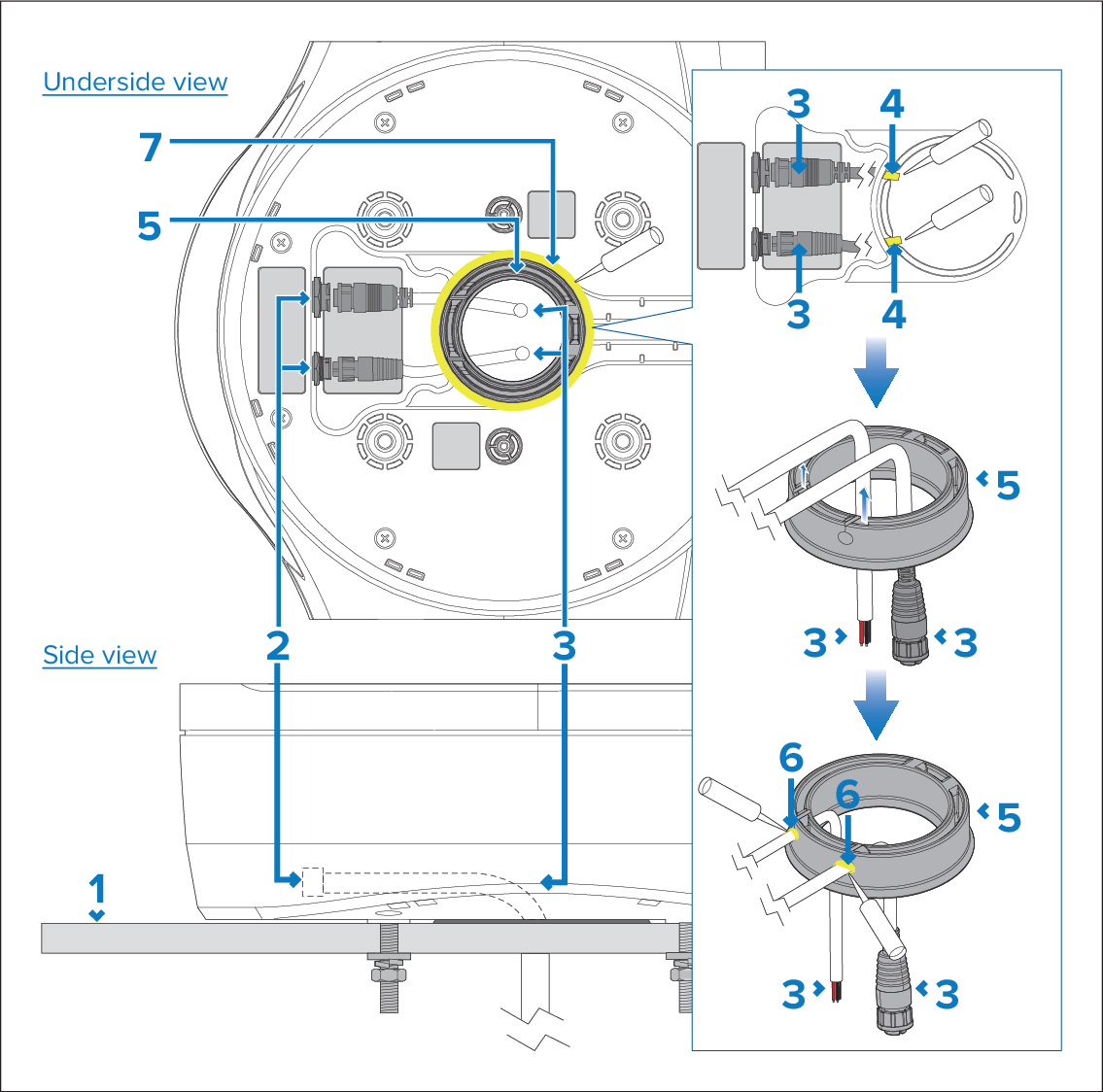
- Connect the power and RayNet cables to the pedestal. Do NOT supply power to the cables at this time.
- Before laying the cables in the exit channels on the underside of the pedestal, apply sealant to each of the cable exit channels at the point where the cables pass through them, as shown in (4) in the illustration below.
- Lay the cables in the channels.
- Pass the cables through the aperture on the underside of the pedestal, and then through the supplied cable gasket.
- Push the cables fully into the slits in the cable gasket, as shown in the illustration below.
- Apply sealant all around the cables at the point where they enter the gasket, as shown in (6) in the illustration below. Ensure 360° coverage all around the cable entries.
- Carefully insert the cable gasket into position in the underside of the pedestal.
- Seal all around both the top and bottom perimeters of the cable gasket, as shown in (7), to ensure a watertight seal with the pedestal. Take care to avoid disturbing the sealant around the cable entries.