LED indications

LED Indication

TroubleshootingPower LED diagnostics

LED Status and required action

(No color) LED has been disabled

  • Ensure that the Always off multifunction display / chartplotter LED setting has not been enabled (requires LightHouse 4 software version v4.6.74 or later). For more information, refer to: Switching off sensor LEDs

(Solid green) Normal operation

  • None (normal power up takes <1 minute).

(Amber) LED has been triggered manually

  • Ensure that the Find me multifunction display / chartplotter LED setting has not been enabled (requires LightHouse 4 software version v4.6.74 or later). Once enabled, the LED indicator shown will appear for a 5 minute duration. For more information, refer to: Switching off sensor LEDs

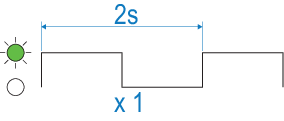
(Green) Unit is initializing; no pilot or compass functions currently available

  • None (normal power up takes <1 minute).

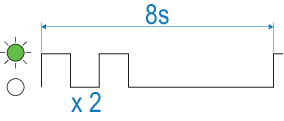
(Green) No DeviceNet connection

  • Ensure network is powered.

  • Ensure network cable and connections are secure and free from damage.

  • If problem persists, contact Raymarine technical support.

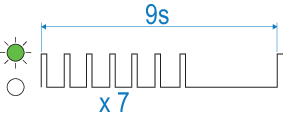
(Green) DeviceNet connected but not receiving data

  • If problem persists, contact Raymarine technical support.

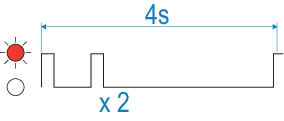
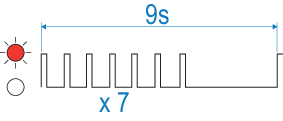
(Red) No SeaTalk NG connection

  • Ensure network is powered.

  • Ensure network cable and connections are secure and free from damage.

  • If problem persists, contact Raymarine technical support.

(Red) SeaTalk NG connected but not receiving data

  • If problem persists, contact Raymarine technical support.