Creating a data page

Note
  • The Add data page option is only available if the remote has less than 6 data pages.

  • If Pilot control is enabled the autopilot must be in Standby for new data pages to be added.
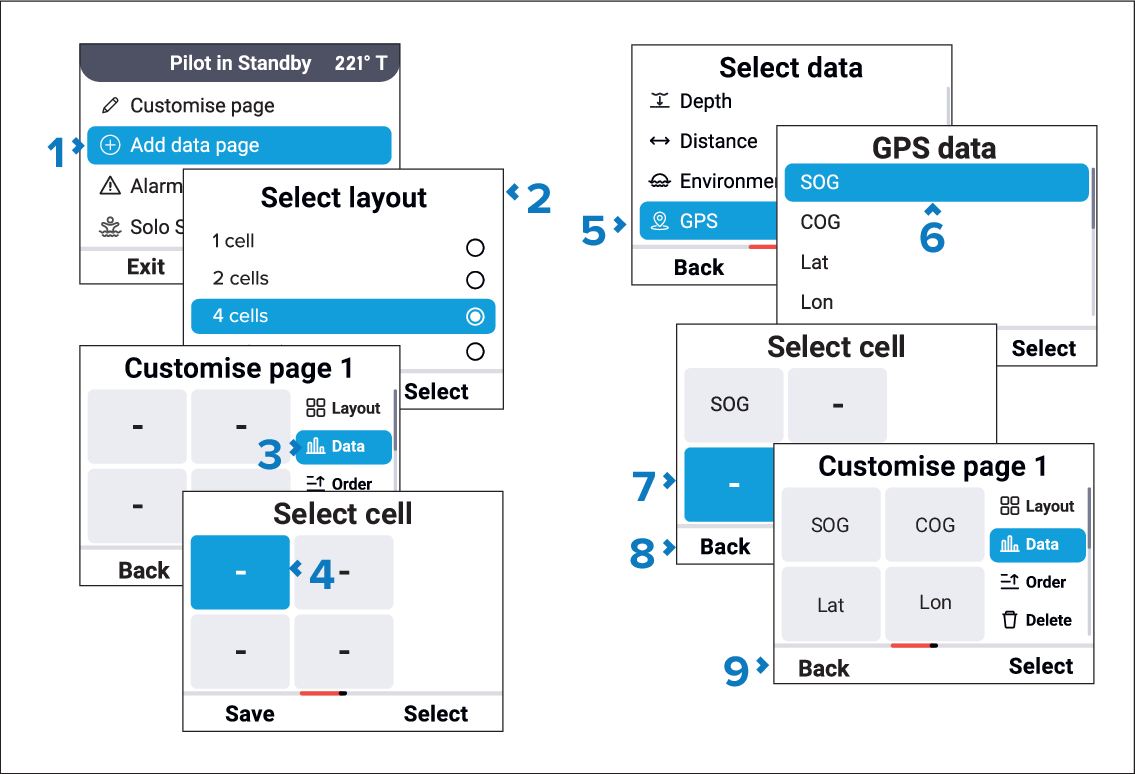
Data pagesCreation

From the main menu:

  1. Select Add data page.
  2. Select a page layout.

    Select 1 cell, 2 cells, or 4 cells as required. You can also add a Navigation page.

  3. Select Data.
  4. Select the cell you want to add data to.
  5. Select the relevant data category.
  6. Select the desired data item.
  7. Repeat steps 5 to 7 for the remaining cells.
  8. Select the Back (Left soft) button.
  9. Select the Back (Left soft) button again to exit the page creation page.