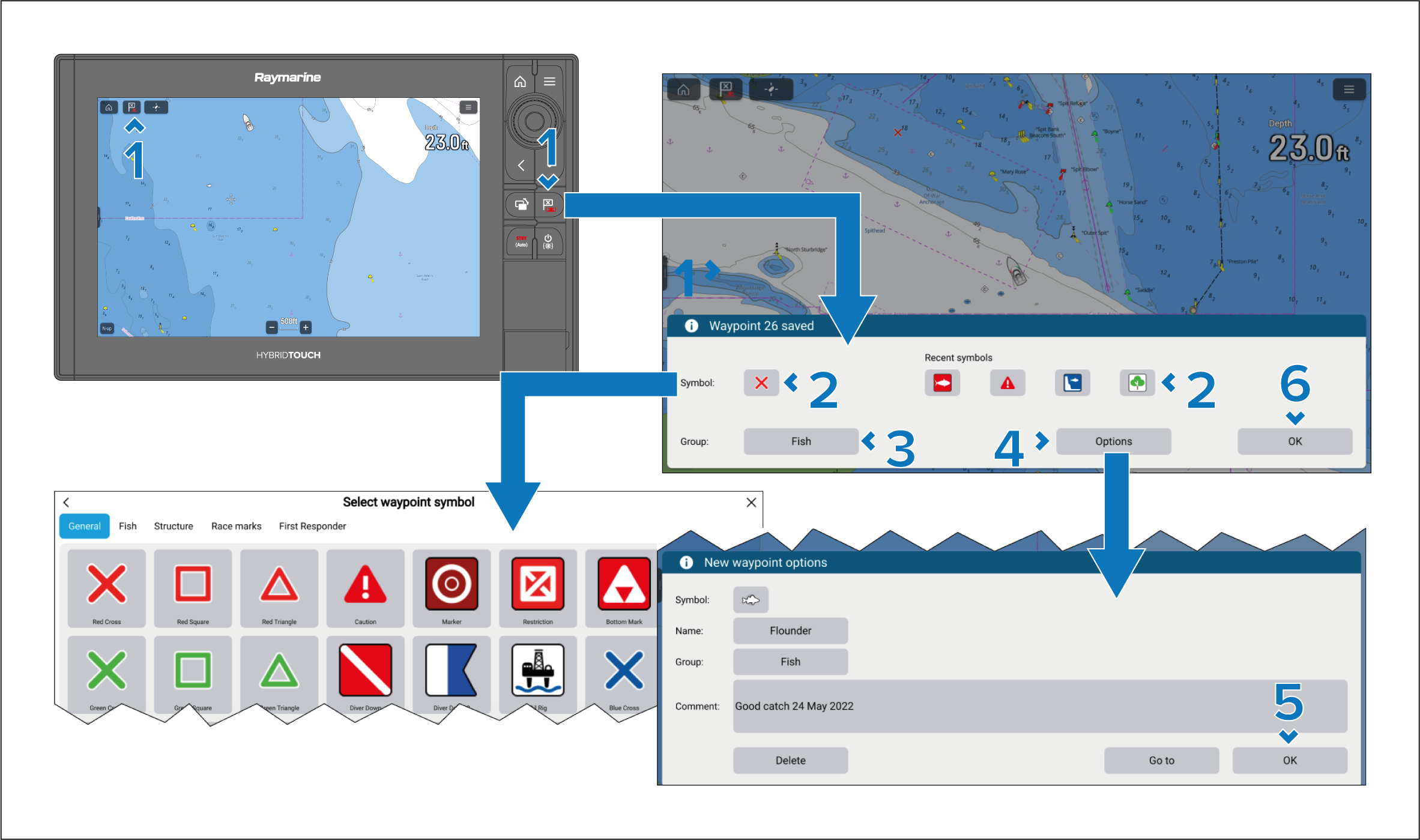
Waypoints can be placed at your vessel’s location from
any app using the Waypoint\MOB icon or, the physical Waypoint/MOB button. The physical button can also be used
to place a waypoint at your vessel’s location from the Homescreen
or when a menu is open.
Chartplotters with physical keys and RMK-Series keypads include a Waypoint/MOB key.
Waypoints Placing a waypointPlacing a waypoint
Select the Waypoint/MOB icon or the
physical button.
Select OK to accept the default waypoint
settings, or:
You can customize the symbol used for the waypoint.
You can either select a recently used symbol, or select the Symbol field to select a symbol from the waypoint symbol
lists.
You can select the Group field to select
or create a group for the new waypoint.
You can select Options to enter further
details about the waypoint.
From the options dialog you can edit the waypoint’s symbol,
name, or group and also enter a comment about the waypoint.
Select OK to accept the waypoint options.
Select OK to close the waypoint dialog.
From the Waypoint options you can Delete the waypoint or perform a Go to.
Note
In additional to the Time and Date the waypoint
was created, when the data is available, Water temperature and Depth
will also recorded in the waypoint details.