Omitting fuel tanks from fuel economy calculations
Omit fuel tanks from the fuel managers economy calculations.
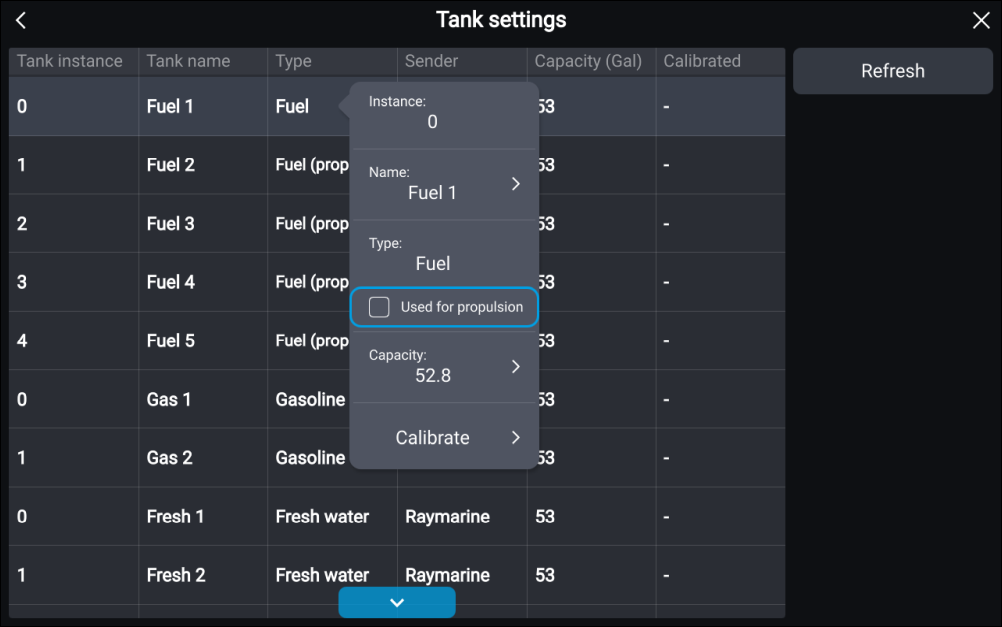
Fuel tanks Omit fuel tankBy default, all fuel tanks are used for fuel economy calculations. If required, you can configure specific fuel tanks so that they are not used in fuel economy calculations.
Note
Fuel tanks Fuel (propulsive)Fuel tanks currently being included in fuel economy calculations will be listed as Fuel (propulsive).
- Fuel tanks Fuel
Fuels tanks listed as Fuel will NOT be included in fuel economy calculations.
Fuel tanks listed as Gasoline will never be included in fuel economy calculations.
From the Data sources settings menu ():
- Select the Configure button adjacent to the TANKS information.
- Select the relevant fuel tank from the list.
- Used for propulsionSelect the Used for propulsion tick box so that the tick is removed.