Calibrating fluid tanks
For the chartplotter to display accurate fluid tank levels the tanks must be calibrated.
Note
Failure to calibrate tanks or calibrating tanks incorrectly may result in inaccurate level readings.
Tanks Calibration
Tanks can be calibrated and edited from by selecting the Configure button from the Data sources settings menu: .
Fluid tanks with
the following Oceanic Systems tank senders can be calibrated:
3271 Volumetric Fuel Sender
3281 Water Level Senders
3125 Tank Sender Adapter
4291 Tank Level Adapter
Note
Ensure tanks are empty before calibration.
Completing calibration will overwrite any existing calibration values.
From the Data sources menu:
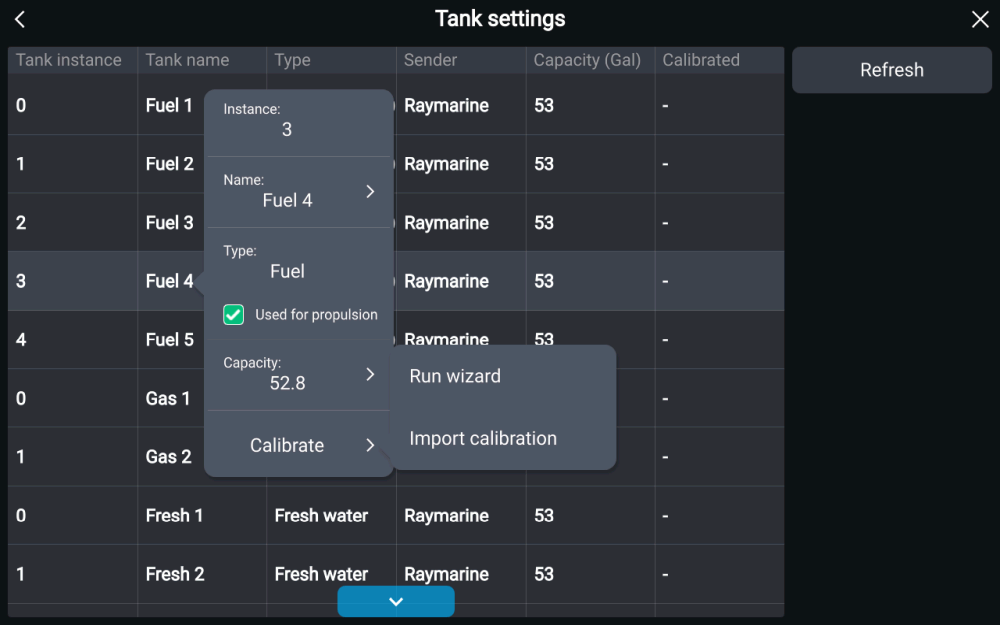
For more information about running the wizard, refer to: Run wizard calibration
For more information about importing calibration data, refer to: Import calibration