Steer to Wind (Polar)
While the Steer to Wind (Polar) mode is active, the following options and visual indicators will be displayed onscreen.
Each widget can be further customized to suit your preference. If you wish to reset the data page to the default configuration, tap-hold one of the available widgets and select Reset page from the list of widget options shown.
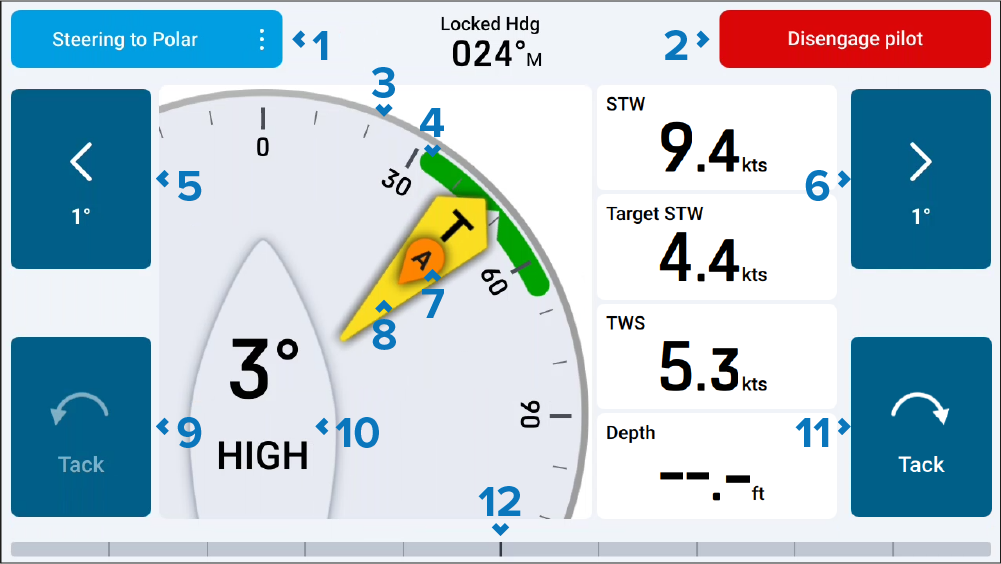
Steering to Polar — Selecting will allow you to switch your autopilot to another ‘steer to’ mode.
Disengage pilot — Selecting will disengage your autopilot, after confirming a disengage pop-up.
Angle gauge — The angle gauge position will dynamically adjust to one of the following positions in order to keep the current wind angle in view:
Upwind Port.
Upwind Starboard.
Reaching Port (currently shown).
Reaching Starboard.
Downwind Port.
Downwind Starboard.
Starboard wind angle target — Align the larger wind indicator (AWA or TWA) with the notch to optimize Velocity Made Good (VMG) when sailing upwind or downwind.
–1° — Selecting will adjust your course by minus 1 degree (up to a maximum of minus 10° from the polar target).
+1° — Selecting will adjust your course by plus 1 degree (up to a maximum of plus 10° from the polar target).
AWA — Apparent Wind Angle.
TWA — True Wind Angle.
Tack / Gybe to Port — Selecting will turn the vessel to the same offset angle on the opposite side of the wind. The autopilot will then adjust the heading to mirror the locked wind angle from the previous tack / gybe.
The Tack option is only available when sailing upwind. For more information, refer to: Tacking in steer to wind mode
The Gybe option is only available when sailing downwind. For more information, refer to: Gybing in steer to wind mode
Wind angle value — Wind angle from the polar target. The displayed value and corresponding description will change according to the wind angle offset from your polar target:
ON TARGET — Shown when the wind angle is on target.
HIGH — Shown when steering closer to the wind direction (while sailing upwind or downwind).
LOW — Shown when steering further from the wind direction (while sailing upwind)
DEEP — Shown when steering further from the wind direction (while sailing downwind).
- Tack / Gybe to Stbd — Selecting will turn the vessel to the same offset angle on the opposite side of the wind. The autopilot will then adjust the heading to mirror the locked wind angle from the previous tack / gybe.
The Tack option is only available when sailing upwind. For more information, refer to: Tacking in steer to wind mode
The Gybe option is only available when sailing downwind. For more information, refer to: Gybing in steer to wind mode
Rudder bar / Wind shift bar (sailing only) — Rudder bar. If your boating activity was set to Sailing during your connected multifunction display / chartplotter’s initial startup wizard, selecting will change between a Rudder bar and a Wind shift bar.