SailPoint
The SailPoint widget includes steering markers and a crosshair, which provide a visual reference of the best target wind angle, to assist you in achieving your vessel’s maximum upwind or downwind Velocity Made Good (VMG) / waypoint Course-to-Steer (CTS). SailPoint also includes a dynamic polar speed indicator which moves up or down to show the percentage polar performance versus the target polar vessel speed for the current wind speed and angle. When the indicator is level with the bottom of the widget, the percentage polar performance is at 60%. When the indicator is level with the centre-line, the target polar vessel speed has been reached.
This widget is only available when the boating activity is set to Sailing, when completing the initial startup wizard for your connected multifunction display / chartplotter.
Widget managementWidget creationWind dataSailPoint
The widget is set to self-correct and counteract the performance display’s tilt angle. All screen objects referenced below will rotate around the center of the crosshair, so that each element remains vertically level with the horizon.
Example: SailPoint widget
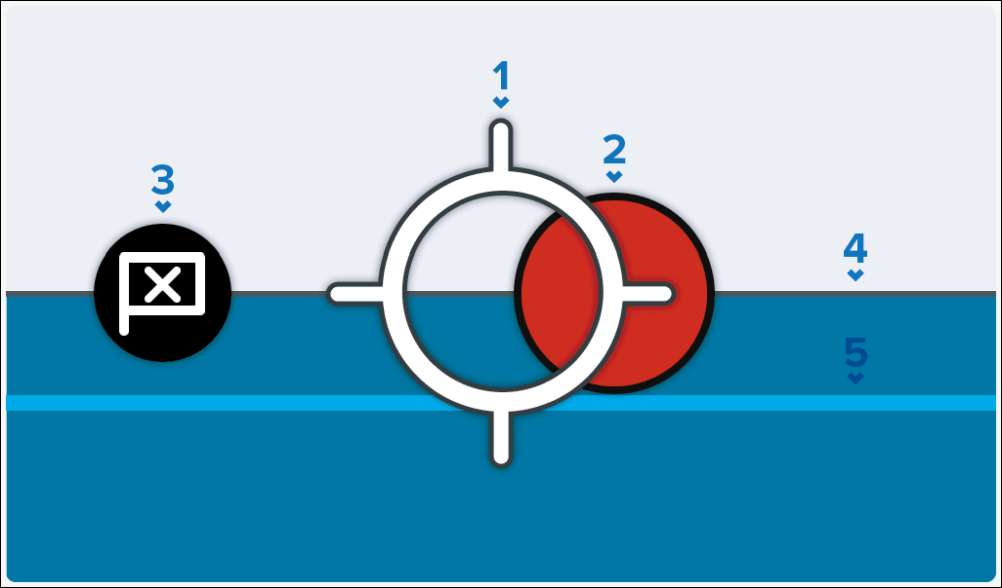
Heading crosshair — Your boat’s heading is represented by a central crosshair. When a marker is within the crosshair, the boat is considered to be on target to achieve the best upwind and downwind Velocity Made Good (VMG) / waypoint Course-to-Steer (CTS), according to your chartplotter’s Fixed Angles / Polar layline configuration.
Steering marker — Indicates the optimum port (red marker as illustrated) or starboard (green marker) tack steering angle (upwind and downwind).
Waypoint marker — Indicates the optimum waypoint Course-to-Steer (CTS).
Target speed — Target polar boat speed for the current wind speed and angle.
Polar performance — Current polar boat performance.