Creating new pages
The + Add page option allows you to create new data pages, based on a series of page presets which can be further customized to suit your preference.
A maximum of 18 data pages can exist at any one time on a performance display. If your performance display already contains 18 data pages, the + Add page option will be disabled.
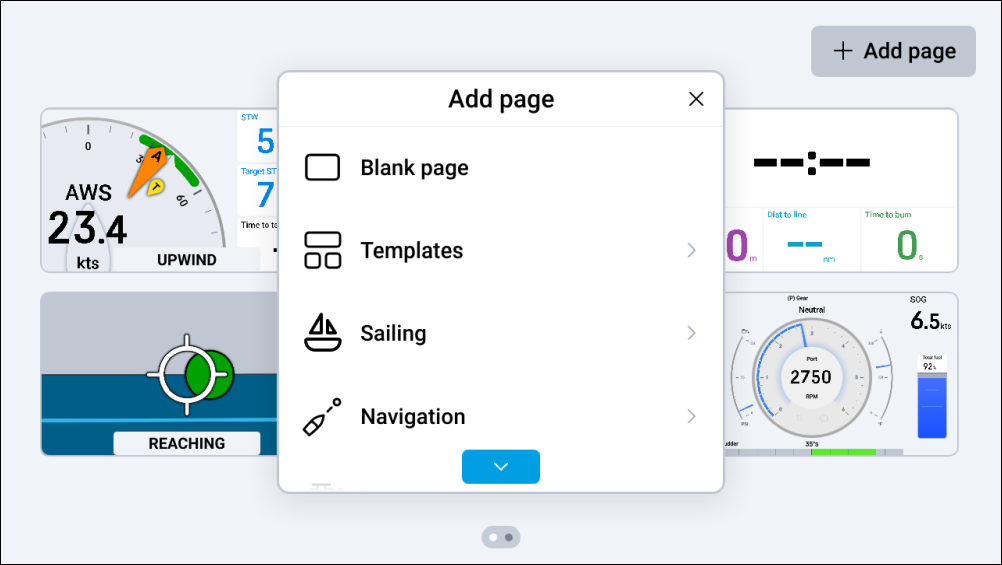
Page managementPage creationPage creation
The following page preset options are available:
Page managementPage creationPage presetsBlank pageBlank page — A blank data page with no widgets.
Page managementPage creationPage presetsTemplatesTemplates — A range of selectable preset data pages which are populated with blank widget cells that vary in number, shape and size.
Page managementPage creationPage presetsNavigationNavigation — A range of selectable preset data pages which are populated with navigation-related widgets.
Page managementPage creationPage presetsSailingSailing — A range of selectable preset data pages which are populated with sailing-related widgets.
In order for the Sailing page preset option to appear, your boat activity must first be set to either General or Sailing, using your connected MFD’s initial startup wizard.
Page managementPage creationPage presetsFishingFishing — A range of selectable preset data pages which are populated with fishing-related widgets.
In order for the Fishing page preset option to appear, your boat activity must first be set to either General, Saltwater fishing or Freshwater fishing, using your connected MFD’s initial startup wizard.
Page managementPage creationPage presetsAutopilot controlAutopilot control — A preset data page which is populated with autopilot control related widgets and 3 separate autopilot control modes that can be engaged and disengaged.
In order for the Autopilot control page preset option to appear, the Control pilot from chartplotter(s) toggle must first be enabled on your multifunction display / chartplotter network, by navigating to: .
Page managementPage creationPage presetsEnginesEngines — A range of selectable preset data pages which are populated with engine-related widgets.
- Navigate to: .
- (If applicable) vertically scroll up and down to find your chosen preset.
- Select the page preset that you wish to create.
- (If applicable) select a sub-page preset.
Your chosen preset will now be created as a new data page.
For further information on each of the available page presets, refer to: Page presets