Wind shift bar
When sailing, wind direction is very important, but does not remain constant in either strength or direction. To use the wind to your best advantage, when the wind direction shifts, the vessel heading should be adjusted accordingly, in order to follow a close-hauled course. LightHouse automatically calculates the mean wind direction, allowing the Wind shift bar to provide an indication of changes in True Wind Direction (TWD) compared with the average TWD recorded over a specified time period.
This feature enables you to use the Wind Shift data display to identify the headers and lifts to help you decide when to tack or gybe.
Sailing Wind shift barWind shift barThe Wind shift bar is available when Sailing has been selected as the boating activity during the initial display start up wizard.
Wind shift time period — The period of time the wind shift data covers can be adjusted. The following time periods can be set: 3 min, 6 min, 12 min, 30 in and 60 min.
Wind shift reset — The wind shift data can be reset which deletes the current stored data and restarts data collection.
The Wind shift bar can be displayed in the Chart app and in the Dashboard app.
Chart app:
Chart app Winds shift barThe Wind shift bar can be displayed in Navigate, Racing and Anchor chart modes and is enabled by default in Racing chart mode.
In the Chart app, the Wind shift bar and Rudder bar cannot be displayed at the same time. When one is enabled, the other is disabled.
The Wind shift bar can be enabled and disabled from the Layers settings menu: .
In the Chart app, the Laylines menu allows you to Reset the data and change the Time period.
Dashboard app:
Dashboard app Wind shift barIn the Dashboard app, the Wind shift bar is included on the default Sailing page and includes a digital wind shift value.
In the Dashboard app, the Rudder bar and Wind shift bar are interchangeable. A Wind shift digital value data item can also be added to any Dashboard app page. The Wind shift digital data item is located in the Wind data category.
In the Dashboard app, the Wind shift bar pop-over options allow you to Reset the data and change the Time period.
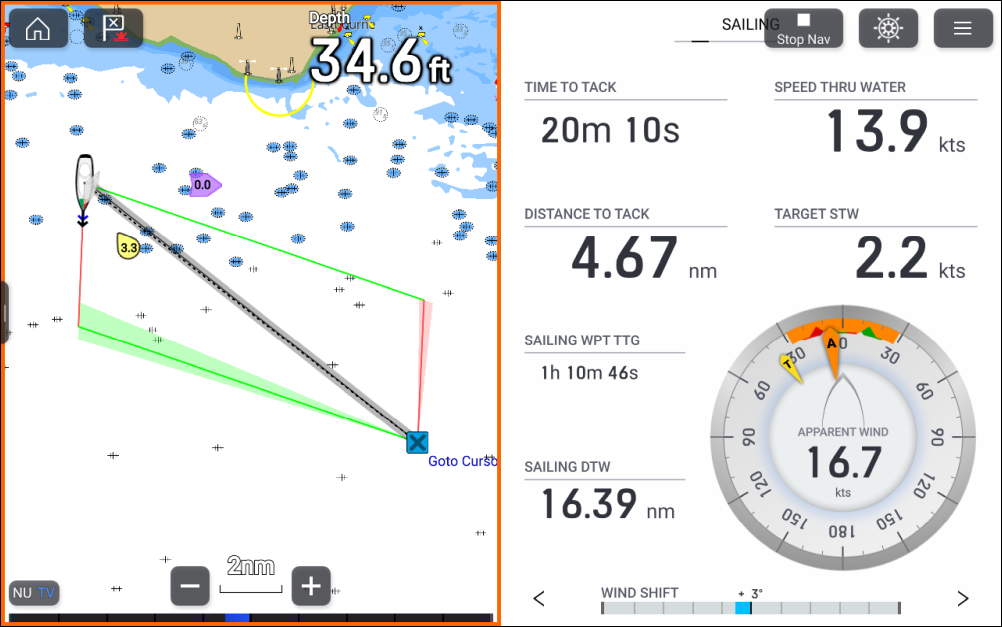
When on a port tack, wind shifts to port are known as “lifts” and are shown as a positive value extending to the left.
When on a port tack, wind shifts to starboard are known as “headers” and are shown as a negative value extending to the right.
When on a starboard tack, wind shifts to starboard are “lifts” and are shown as a positive value extending to the right.
When on a starboard tack, wind shifts to port are “headers” and are shown as a negative value extending to the left.
The same rules apply regardless of whether you are travelling upwind or downwind.