Weather mode
Weather mode allows you to track weather systems in relation to your vessel by overlaying live, historical and forecasted weather data directly on the chart. In weather mode you can also view animated weather graphics and read weather reports. Weather mode is available in the chart app if you have a compatible Sirius weather receiver and valid subscription. Switching the chart app to weather mode allows you to overlay weather data and information from your weather receiver.
Use of weather mode is subject to acceptance of the disclaimer that is displayed when weather mode is activated. Please read and ensure you understand the disclaimer’s conditions.
Weather mode should NOT be used for navigation. Contours used for safe navigation and related markings and objects are hidden in weather mode. Active navigation controls and menus are also not available.
Weather data is only available in North America and its coastal waters.
To enter weather mode, open the chart app menu, select Mode: and then select the weather icon.
In weather mode the Chart orientation is fixed in North-Up mode.
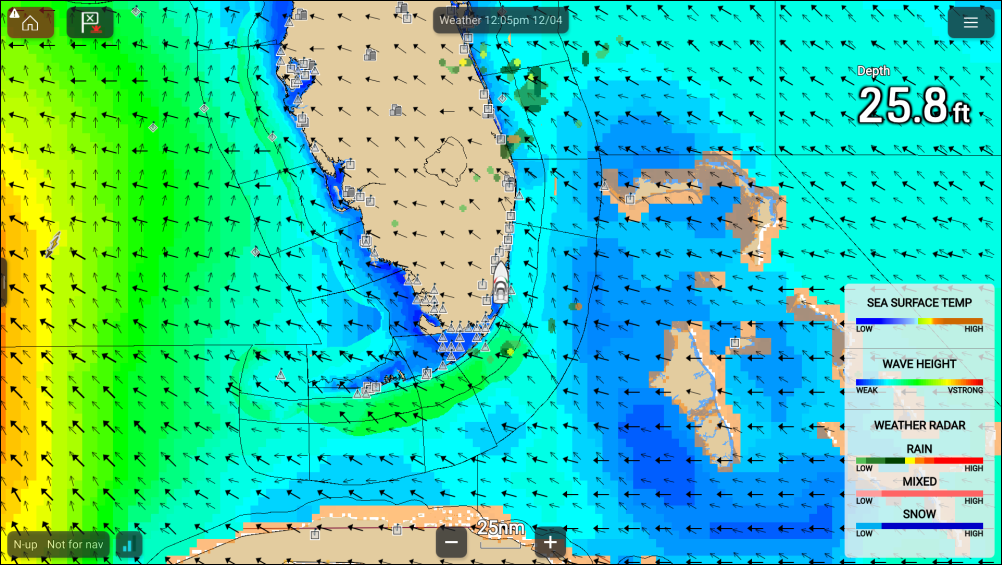
Weather symbols are organized into layers, accessible from the chart menu: . Each layer can be enabled and disabled independently. For details refer to: Weather layers