Tides mode
In Tides mode the Tides animation control is displayed onscreen and the Tide station and Current station symbols in the Chart app are replaced with dynamic graphics which identify Tide and Current conditions. You can use the animation controls to play Tide and Current predictions for a 24 hour period. The own vessel Tide vector is also enabled in Tides mode.
The Tides mode is only available if you have cartography that provides the Tides and Current data. Refer to your cartography provider for more information.
The Tides mode requires accurate date information, usually taken from the GNSS (GPS) position data available to your MFD. Alternatively, you can input a specific date manually.
ChartTides mode
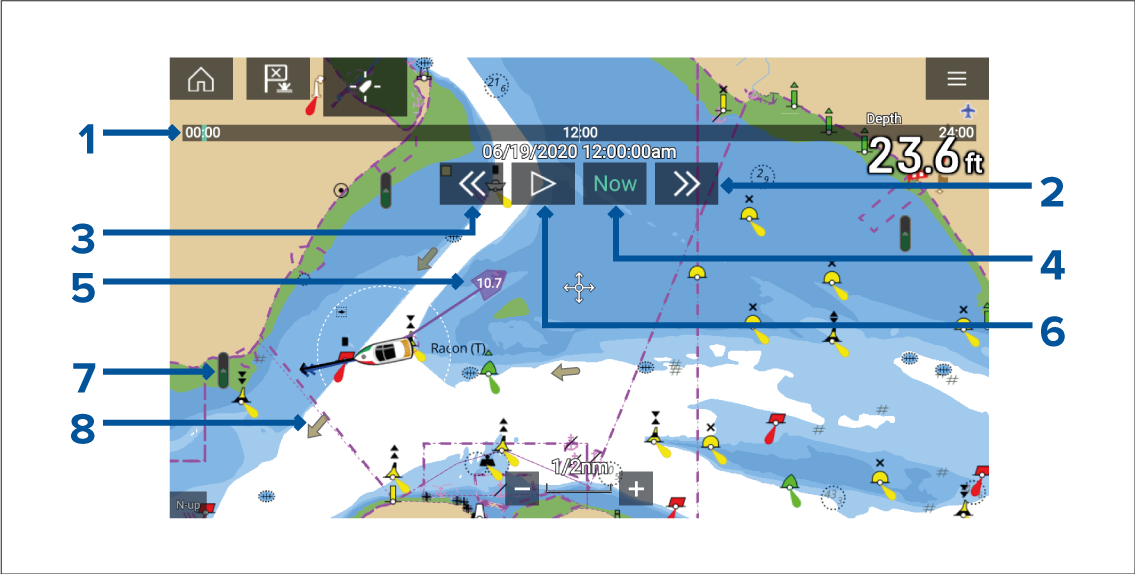
ChartTide animationCurrent animationAnimation progress bar — The progress bar is Blue for the current 24 hour period, or Green when playing animations from a different day.
Skip forwards — Skips forwards in user defined intervals, when the end of the progress bar is reached skipping forward will progress to the next day.
Skip backwards — Skips backwards in user defined intervals. When the beginning of the progress bar is reached, skipping backward will regress to the previous day.
Skip to the actual date / time — Position data is required from your GNSS (GPS) receiver to obtain current date and time.
Own vessel tide (Set and Drift) vector.
Play / Pause animation — When the animation is playing it will cycle through the current 24 hour period continuously.
Dynamic tide height graphic.
Dynamic current graphic.
The data provided in the Tide and Current graphs and graphics is for information purposes only and must NOT be relied upon as a substitute for prudent navigation. Only official government charts and notices to mariners contain all the information needed for safe navigation.