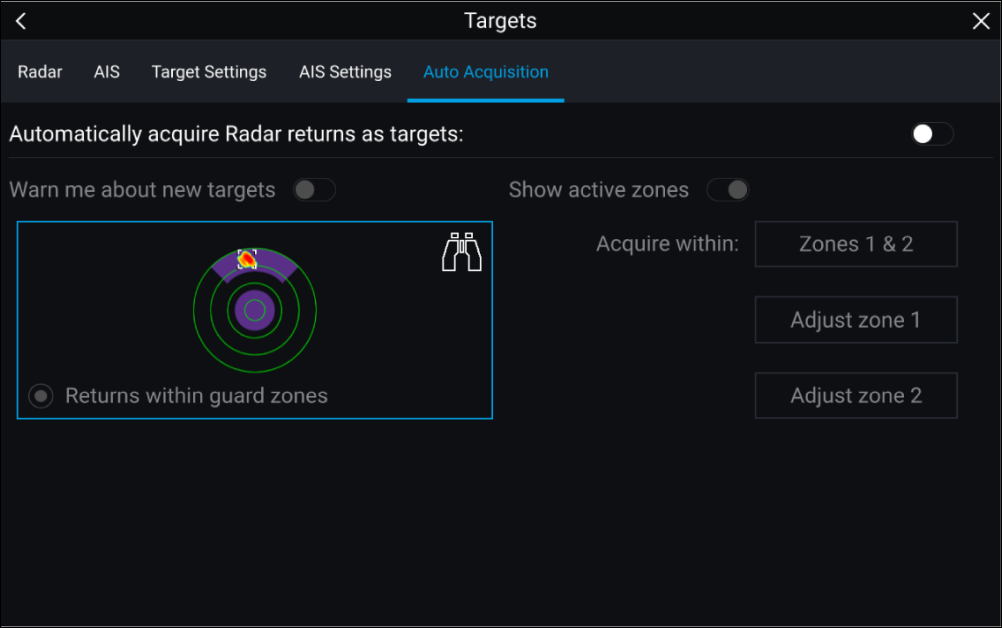
Follow the steps below to configure automatic target acquisition.
Radar targetAutomatic acquisition
- Select the Auto Acquisition tab from
the Target menu: ().
- Enable Automatic Target Acquisition by selecting the Automatically acquire Radar returns as targets toggle switch.
- Select the Acquire within box and choose Guard zone 1, Guard zone 2 or Zones 1 & 2 as required.
- To enable onscreen pop-up notifications of new targets
which have been acquired automatically, select the Warn me
about new targets toggle switch.
When multiple targets are acquired simultaneously, an
Info dialog is displayed.
- You can also adjust the size and position of the Guard
zones directly from the Auto Acquisition page by
selecting Adjust zone 1 or Adjust zone
2.