RNS-8 Diagnostic information
The following range of diagnostic information is available for the RNS-8 Network switch, which can be displayed on chartplotters running LightHouse v4.5.84 or later.
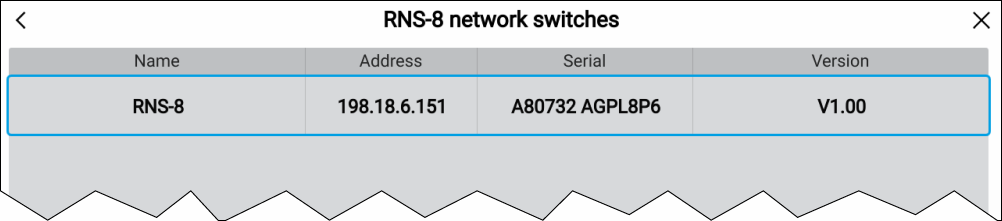
To view RNS-8 diagnostic product information on the chartplotter, select RNS-8 from the Diagnostics pop-over menu on the display: .DiagnosticsProduct info
The following diagnostic information is displayed:
Diagnostic |
Description |
|---|---|
Name: |
Provides the product name. |
Address: |
Provides the product IP address. |
Serial: |
Provides the product serial number. |
Version: |
Provides the product software version number. |
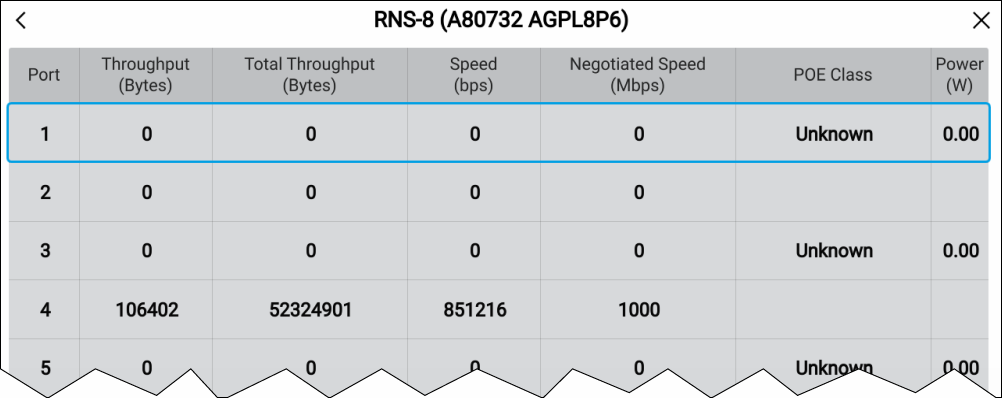
Additional port diagnostic information can be displayed by tapping the row for the relevant unit and then selecting Port traffic. Once selected, the following port diagnostic information is displayed:
Diagnostic |
Description |
|---|---|
Throughput (Bytes) — (port 1–8): |
Provides the current amount of data (Bytes) that is currently being transferred via your network switch from a specific port. |
Total Throughput (Bytes) — (port 1–8): |
Provides the total amount of data (Bytes) that has been transferred via your network switch from a specific port. |
Speed (Bits/sec) — (port 1–8): |
Provides the current data transfer speed (in Bytes per second) for a specific port. |
Negotiated Speed (Mbits/sec) — (port 1–8): |
Provides the port’s maximum data transfer speed (10/100/1000 Mbps), which is negotiated during connection. |
POE Class (Watts) — (PoE ports 1, 3, 5, 7): |
Provides the PoE classification of a connected PoE Powered Device (PD), and, the maximum power consumption (Watts) required by the PoE classification. |
Power (Watts) — (PoE ports 1, 3, 5, 7): |
Provides the current power consumption (Watts) of your connected Powered Device (PD). Note The network switch can output a maximum of 120 Watts, for consumption by up to 4 PoE Powered Devices (i.e. 30 W maximum per Powered Device ). |