Propulsion system settings
Propulsion system settings are provided in the Boat details settings menu.
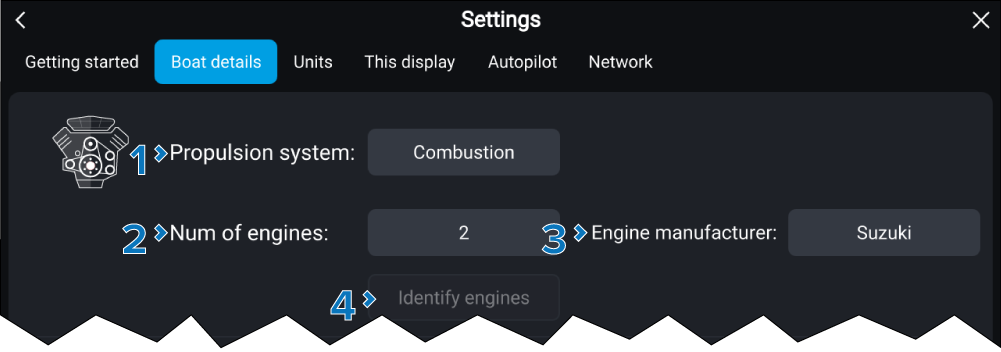
The following Propulsion system settings are available:
Setting |
|
|---|---|
1 |
Propulsion system:Propulsion system Configure your vessel for either Electric motors or Combustion engines. |
2 |
Num of engines: / Num of motors:Engine quantity Select the number of Combustion engines or Electric motors on your vessel. When connected to a compatible system engine/motor data will be available. |
3 |
Engine manufacturer:Engine manufacturer To integrate engines from a specific manufacturer select the relevant manufacturer from the list.
This setting is disabled for Electric propulsion systems. |
4 |
Identify engines:Engine connection wizard Once you have selected the number of engines, select Identify engines and follow the onscreen instructions to configure your engines. May require an extra hardware interface to enable engine data to be displayed. |
5 |
Configure Yamaha Quad display:Engine quad display Select whether to display data for a twin engine system, or for the port or starboard side of a quad engine system. This setting only applies when Yamaha or Yamaha HDMI has been selected as the Engine manufacturer. |
For more information about Propulsion system settings refer to: Propulsion system overview
For more information on engine integration refer to: Engine integration & autopilot control