Navigation mode
Navigation mode allows the Trolling motor to follow any active navigation set by the display (i.e.: performing a “Goto”, or following a route).
Sidebar TrollingTrolling motor Navigation mode
You can enter navigation mode directly by deploying the motor and then initiating a Goto or following a route on your MFD/chartplotter. A prompt will then be displayed asking if you wish to navigate using the trolling motor.
To initiate a “goto”, the waypoint must be within 1 kilometer of your boat
When following a route, each waypoint must be within 1 kilometer from the previous waypoint.
When following a route, if the next waypoint is over 1 kilometer away, the Trolling motor will switch to Manual control with 0% thrust.

Figure 1. Example goto cursor notification
When following a route, the Trolling motor will automatically advance to the next waypoint on waypoint arrival.
The normal waypoint arrival notification does not apply when using the trolling motor.
When the destination waypoint is reached, the Trolling motor will automatically switch to Anchor mode to maintain the boat’s position at the destination point.
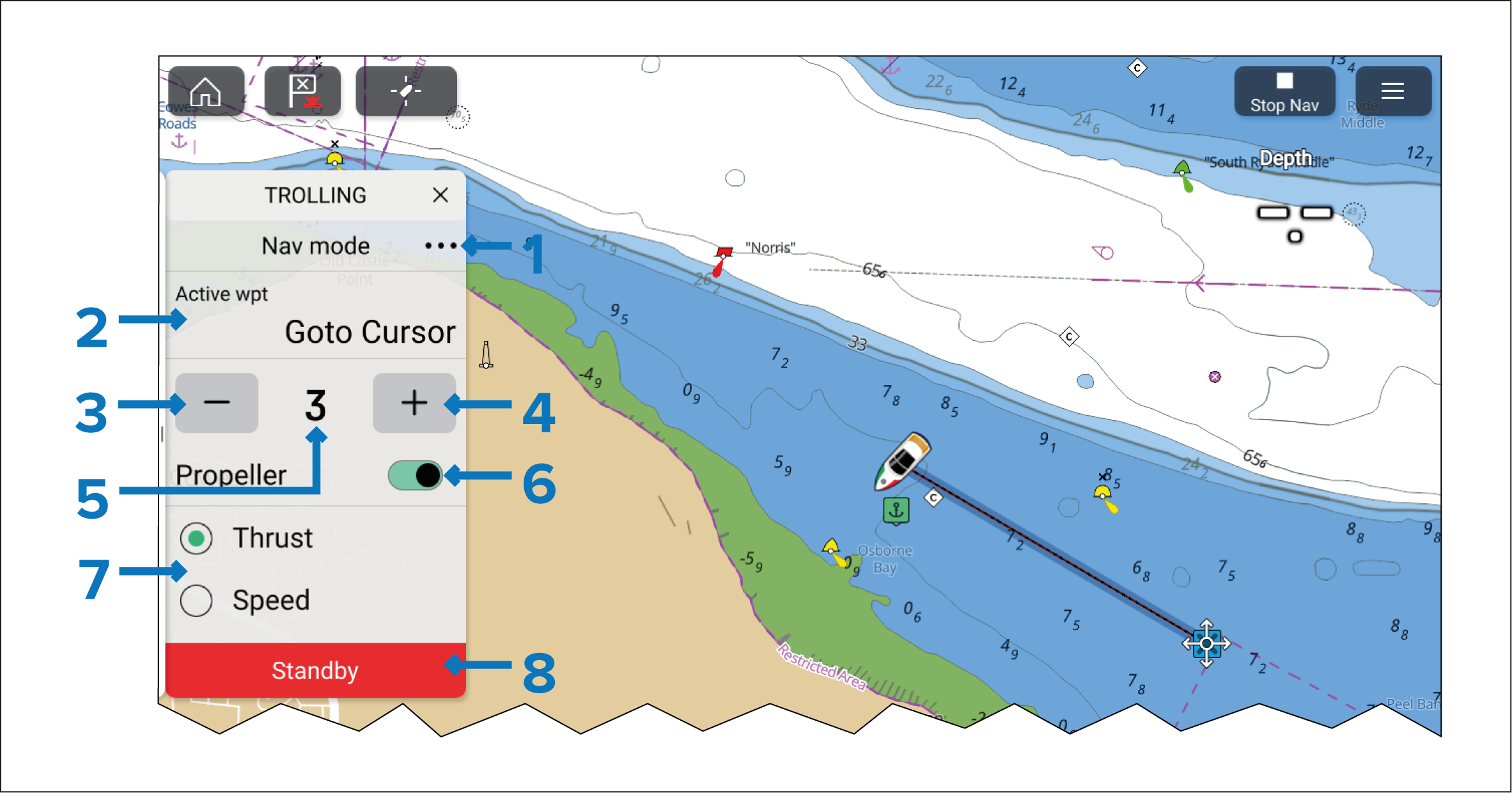
The Navigation sidebar includes the following controls:
Menu — Select the three dots to access the available Trolling motor modes.
Active waypoint name.
Decrease thrust/speed.
Increase thrust/speed.
Current thrust percentage/speed.
Propeller — Engages and disengages the trolling motor’s propeller. (Only available on Power-Pole® trolling motors).
Thrust/Speed selection — If required, Thrust and Speed can be switched by selecting the relevant option.
Standby — You can select Standby at any time to place the Trolling motor into standby mode.
When active navigation is cancelled on the display, the Trolling motor will automatically switch to Manual control mode.
Speed/thrust and steering range and increments are determined by the Trolling motor and as such could be different or change.