MFD controls
The MFD controls are automatically hidden when using the YouTube and YouTube TV apps.
YouTubeMFD controls
To access the MFD controls when the YouTube or YouTube TV apps are displayed:
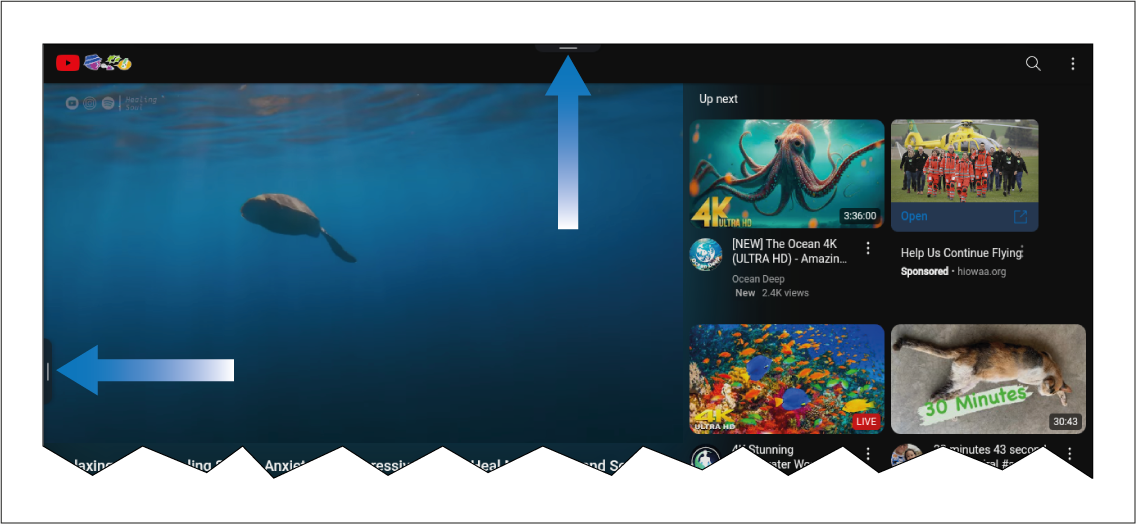
Slide the Sidebar menu handle (located on the left side of the screen) to open the Sidebar.
Pull down on the menu handle (located at the top of the screen) to access MFD controls:
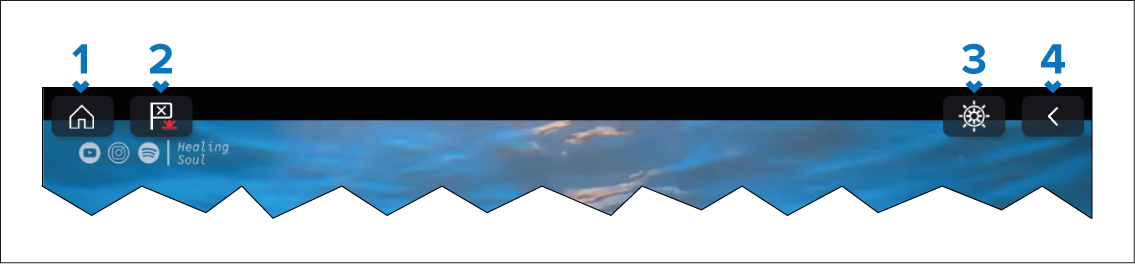
Home icon — Select to go back to the Homescreen.
Waypoint/MoB icon — Select to place a waypoint at the vessel’s current location. Alternatively, a long touch of the Waypoint/MoB icon onscreen triggers the MoB alarm.
Pilot icon — Select to open the Pilot sidebar.
Back icon (only available when viewing a video). — Select to go back to the YouTube / YouTube TV homepage.