Inserting memory card into external storage devices
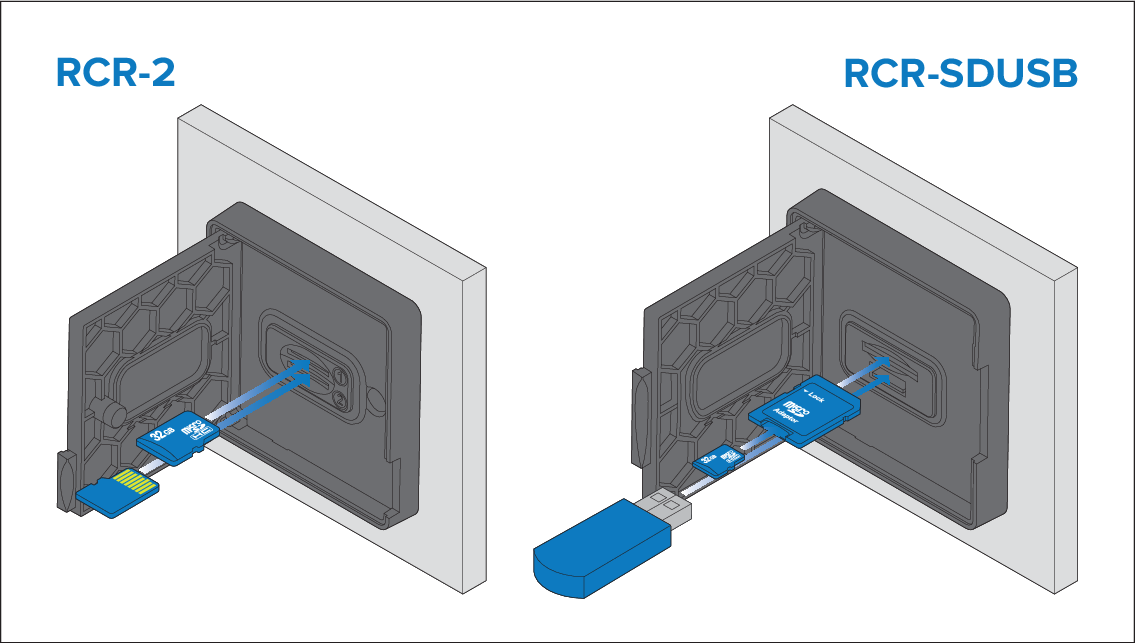
- Open the card reader door.
- Insert the storage device into a card slots as follows:
- RCR-SDUSB slot 1 — With the contacts facing down, insert an SD card (or an SD card adaptor containing a MicroSD card) into the upper slot and push until it clicks into place.
- RCR-SDUSB slot 2 — With the contacts facing down, insert a USB drive directly into the lower slot.
- RCR-2 slot 1 — With the contacts facing down, insert a MicroSD card into the upper slot and push until it clicks into place.
- RCR-2 slot 2 — With the contacts facing up, insert a MicroSD card into the lower slot and push until it clicks into place.
NoteRCR-2 external card readers are not compatible with Axiom® 2 displays.