Fuel set up
The fuel manager can be enabled and configured from the Fuel set up menu.
Fuel managerSet-up
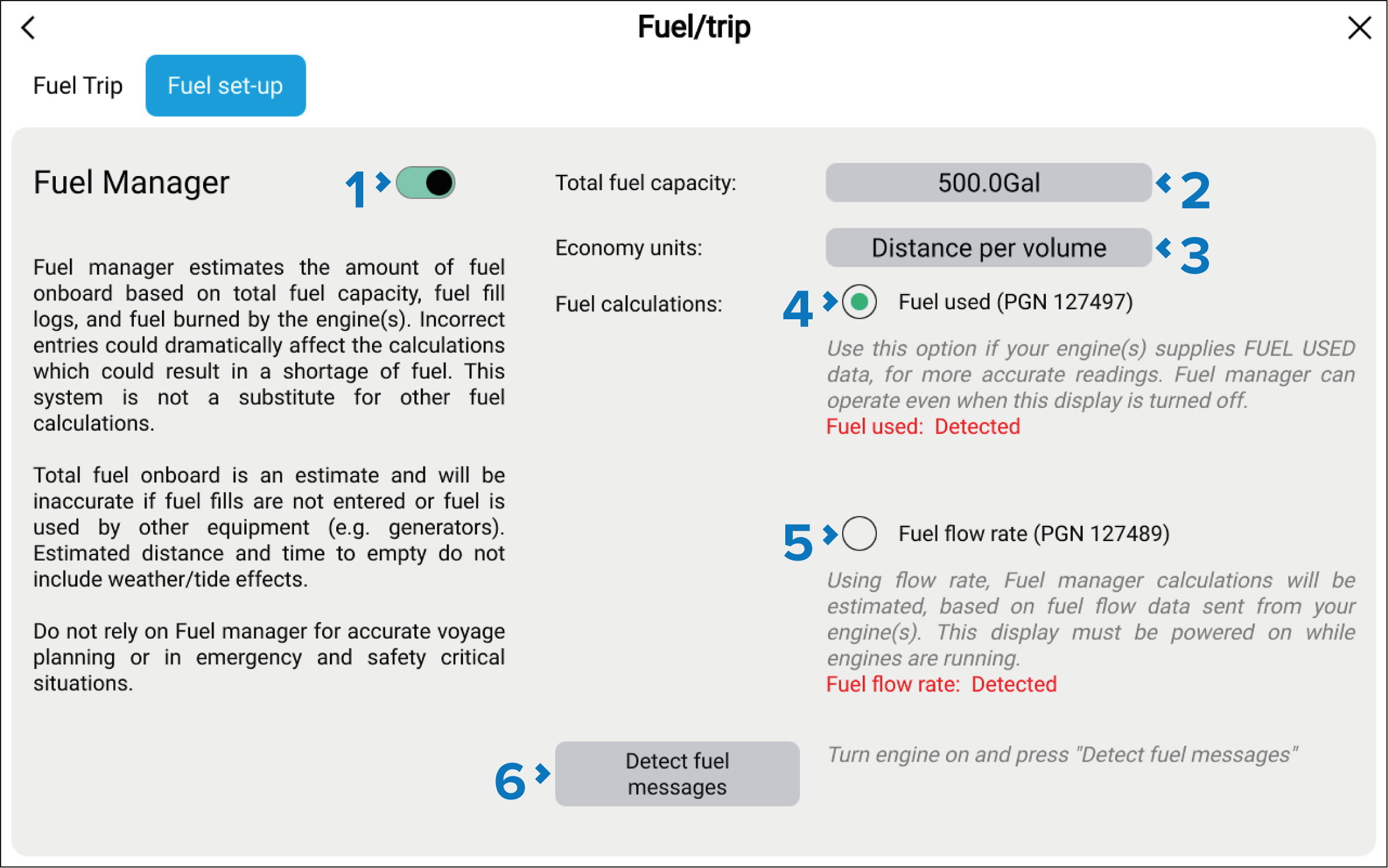
Fuel Manager — Select to enable or disable the fuel manager.
Total fuel capacity — Sum of total capacity of all your fuel tanks.
Economy units — Economy units used in data overlays, Side bars or the Dashboard app.
(1)Fuel used (PGN 127497) — Use this option if your engine(s) supply Fuel used data. When Fuel used is selected the Fuel manager will continue to operate when the MFD is switched off. This option usually provides more accurate readings.
(1)Fuel flow rate (PGN 127489) — this option estimates fuel calculations based on fuel flow rate data sent by your engine(s). Your MFD must remain switched on, whilst engines are running.
Detect fuel messages — If you are unsure which engine messages your engine provides, select this option to determine the correct message.
(1)When Yamaha, or Yamaha HDMI is selected as the Engine manufacturer in the Boat details menu, Yamaha’s own fuel manager will be used for fuel calculations instead.