Frequency tuning
When using an Airmar® CHIRP transducer you can adjust the frequency of the ‘Tuned’ sonar channels (e.g.: 50 kHz, 200 kHz channels.), using the Tune frequency control.
Fishfinder app Tune frequencyFrequency tuningThe Tune frequency setting can be accessed using the onscreen controls and from the Sounder settings menu.
The Tune frequency control is available when using CP470, CP570, RVX1000, and RVM1600 external sonar modules and chartplotters that include a 1 kW internal sonar module. The Tune frequency control is not available when using the CP370 sonar module.
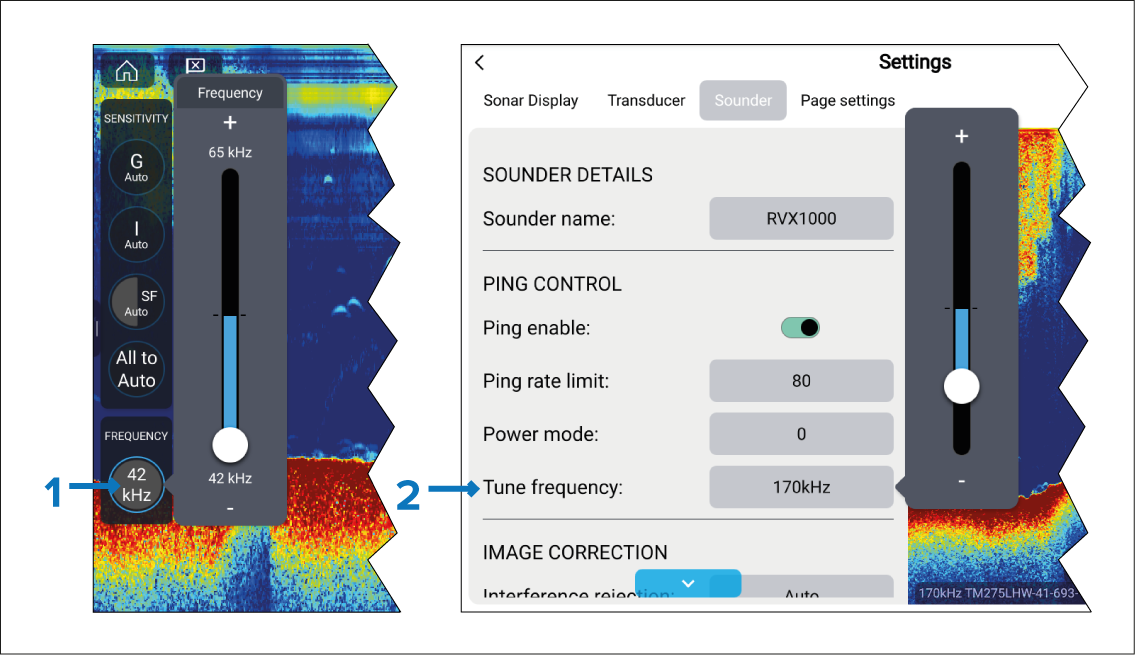
Onscreen Tune frequency control. To adjust the channel frequency using the onscreen controls, select the Image adjustment icon located on the bottom left of the screen, select the Frequency control, and then use the slider bar to adjust the channel’s frequency.
Settings menu Tune frequency control. To adjust the channel frequency from the settings menu, select , select the frequency field and then use the slider bar to adjust the channel’s frequency.
The sonar channel name located at the bottom of the Fishfinder app is updated dynamically to reflect the selected frequency.
The frequency range available is determined by the transducer/sonar module in use. The minimum and maximum supported frequencies are displayed on the slider bar.