Fish mapping mode
Fish mapping mode is a chart mode that enables you to utilize Sirius XM fishing data in the Chart app. When compatible hardware (e.g.: SR200) is detected, fish mapping mode will be available. Fish mapping mode requires a valid SiriusXM subscription. To find out more about fish mapping data and subscriptions visit the SiriusXM website: www.siriusxm.com/marine
SiriusFish mapping ChartFish mapping mode Fish mapping mode overlays fishing layers and fishing recommendation locations on the Chart app.
Use of fish mapping mode is subject to acceptance of the disclaimer that is displayed when fish mapping mode is activated. Please read and ensure you understand the disclaimer’s conditions.
Fish mapping mode should NOT be used for navigation. Contours used for safe navigation and related markings and objects are hidden in fish mapping mode. Active navigation controls and menus are also not available.
Fish mapping data is only available in North America and its coastal waters.
To enter fish mapping mode, open the Chart app menu, select Mode:, and then select the fish mapping icon.
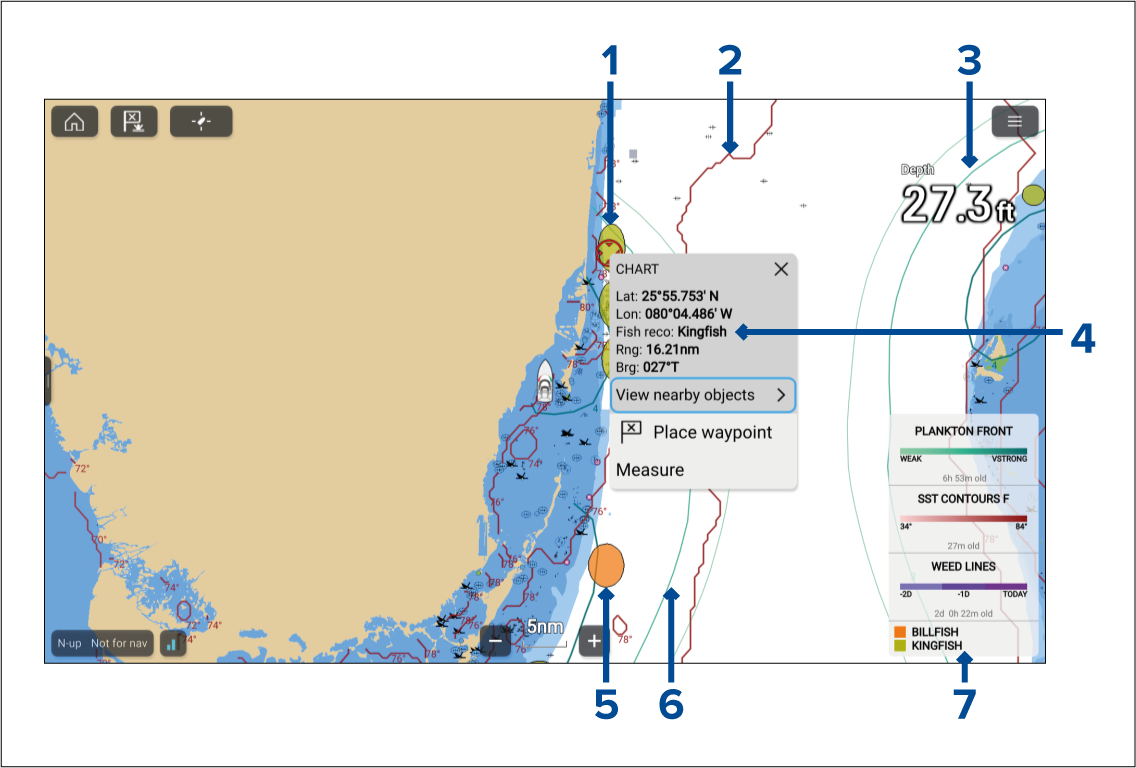
Example fishing recommendation — Kingfish location.
Example fishing layer — SST contour front.
Fishing layer example — Plankton front, weak contour.
Example context menu — Fishing recommendation.
Example fishing recommendation — Billfish location.
Fishing layer example — Plankton front, very strong contour.
Fish mapping legend.
Fishing mapping layers and Fishing recommendation layers are also available in the Chart app’s Fishing chart mode.