Doppler mode
When a compatible Radar scanner is connected, Doppler mode is available.
Doppler mode — Enabling and disabling
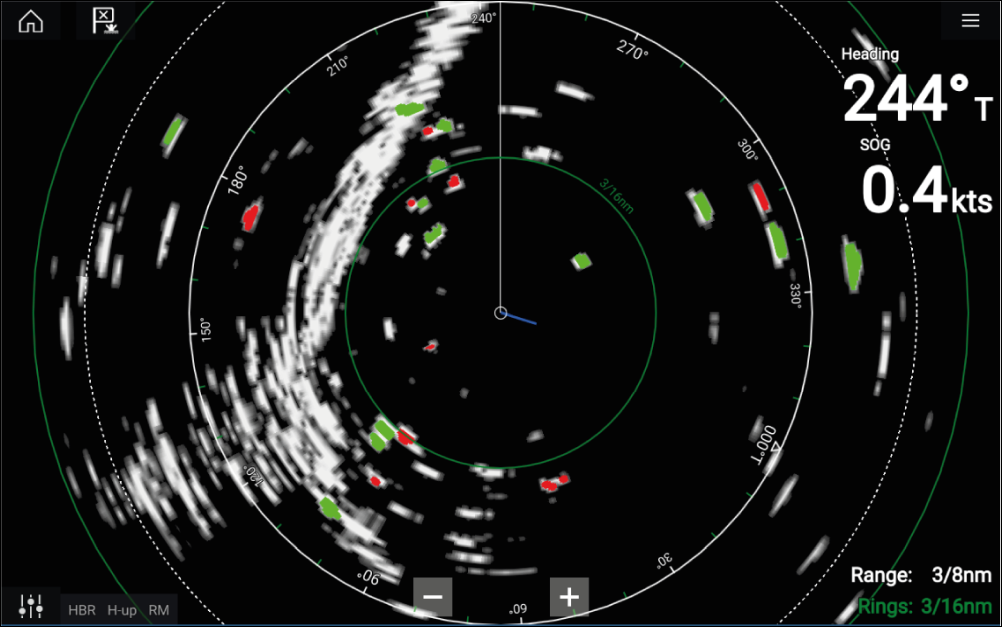
Radar DopplerModeDoppler mode is enabled from the Main menu: .
With Doppler mode enabled, the color palette will change to the default Doppler palette: All approaching targets will be colored Red, and all targets moving away from you will be colored Green.
Doppler mode is suspended at ranges of 12 nm and greater. The Radar color palette will remain the same but targets will not be highlighted.
Doppler mode — Color palettes
Radar DopplerColor palettesDoppler has unique color palettes which help to ensure the Red and Green Doppler targets stand out from the Radar image. When Doppler is enabled, the standard color palette setting will show only the unique Doppler color palettes: Doppler grey, Doppler blue and Doppler yellow. A Full Color option is also available.
If ‘Full color’ is selected for the Radar palette, approaching targets will appear Pink instead of Red.
The Color palettes can be selected from the Presentation tab: .