Creating a Route

Routes can be created directly in the chart app.

RouteCreation
Note
  • When creating routes ensure that the waypoints are farther apart than the distance specified in the waypoint arrival alarm settings.

  • If you place a waypoint in the wrong location you can select Undo at any time to remove the last waypoint placed.
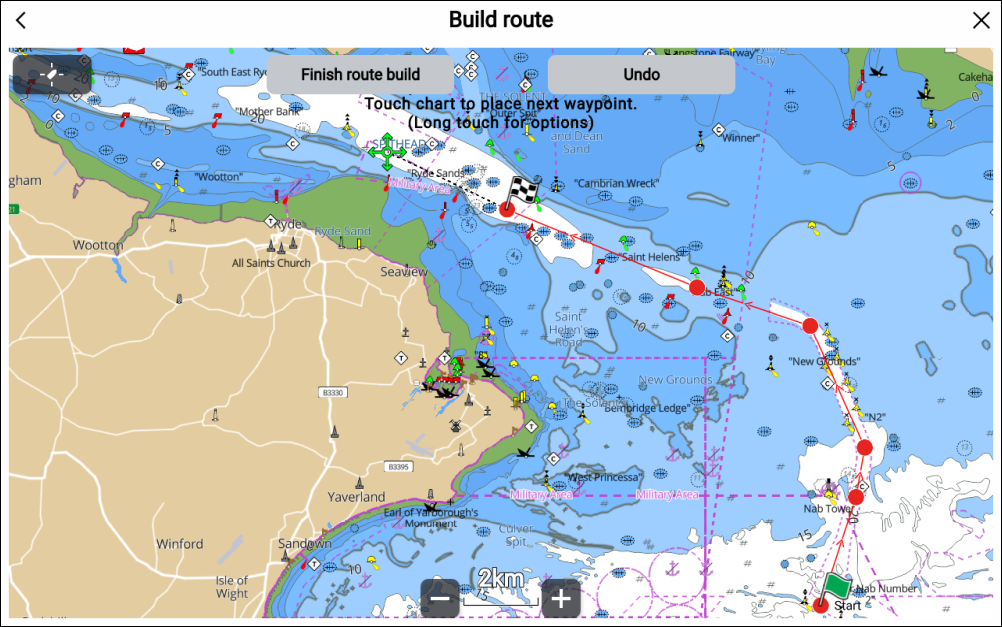
  1. Select and hold on the location for the first waypoint.
  2. Select Build route from the context menu.
  3. Select the location for the second waypoint.
    The 2 waypoints will be joined by a line, creating the first leg of your route.
  4. Select the locations for subsequent waypoints.
  5. Check your route will be safe to follow, you can move the waypoints in your route by dragging them to a new location.
  6. When your route is complete select Finish route build.