ClearCruise® settings (Object Detection / Video Analytics)
Object Detection (Video Analytics) features and settings can be enabled and disabled in the ClearCruise settings in the Video app.
ClearCruiseObject detectionObject detectionClearCruise settingsVideo Analytics
.
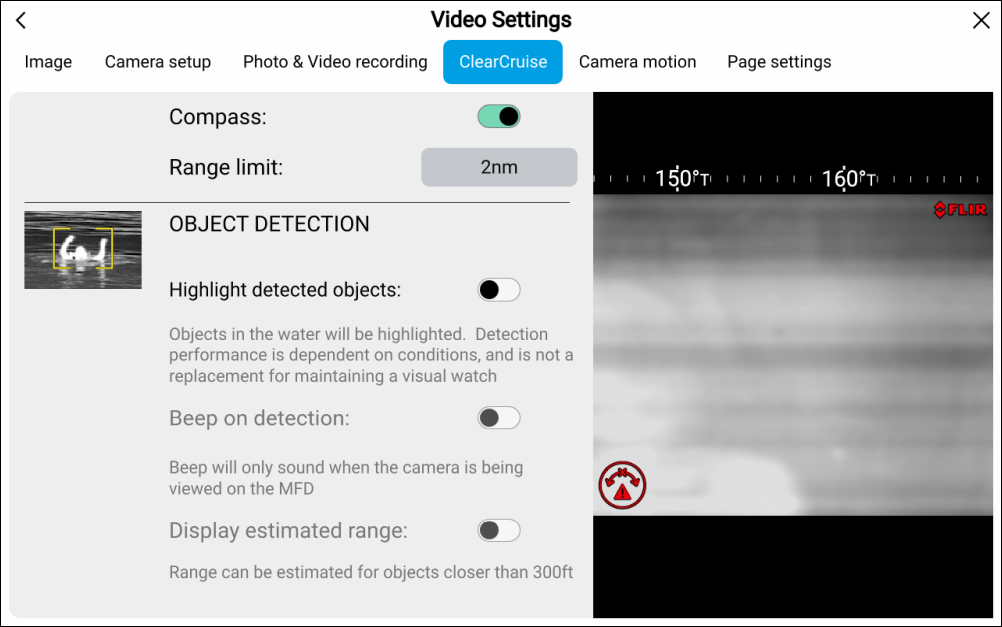
| Setting | Description |
|---|---|
Highlight detected objects |
Enables/disables object highlighting. |
Beep on detection |
Enables/disables an audible beep when an object is detected (Highlight detected objects must be enabled). |
Display estimated range |
Enables/disables display of an object’s estimated range from your vessel (Highlight detected objects must be enabled, and the object must be closer than approximately 100 m (~300 ft). |
ClearCruise® Object Detection (Video Analytics) is only compatible with cameras that are positioned upright. ClearCruise® Object Detection will not function with cameras that are upside down and have vertical flip enabled.