Obstruction alarm detection zone
If a Chart app instance is opened that uses the same legacy LightHouse Charts cartography as the Obstruction alarm’s Cartography source, then a detection zone is drawn around the vessel icon. The detection zone outline turns Red when the Obstruction alarm is triggered.
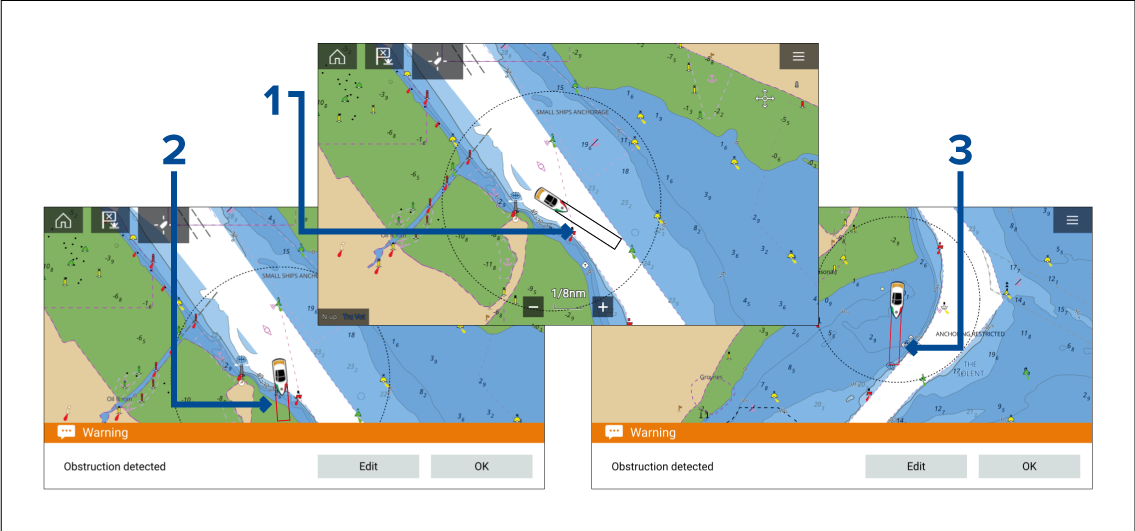
When there is no obstruction present, the detection zone outline is colored black until an obstruction is detected.
When the charted depth is the same depth as, or less than the specified safety depth, the Obstruction alarm is triggered.
When the charted object is the same depth as, or less than the specified safety depth, the Obstruction alarm is triggered.
Once the Obstruction alarm has been configured, the alarm parameters can be modified from the Collision avoidance menu tab in the Chart app:.
You will not be able to use the Obstruction alarm if the Cartography source has not been set in the Alarms manager.
Obstructions may not be displayed at all Chart app ranges, so you may need to Range in to see the object that triggered the Obstruction alarm.